Introduction
A regional masala brand selling across Blinkit, Zepto, and Swiggy Instamart in five cities just discovered their top-selling SKU had gone out of stock in three high-demand dark stores — but only after their weekly sales report arrived. By then, orders were lost, search rankings had dropped, and a competitor had filled the gap.
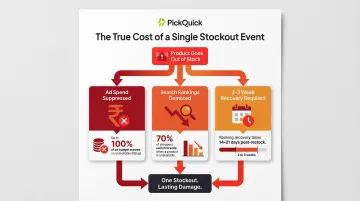
Most regional brands still rely on manual stock checks or delayed platform reports to manage dark store inventory — on platforms that promise delivery in 10-12 minutes. When a product goes out of stock, it disappears from search results entirely. Your availability score drops, algorithmic penalties kick in, and ranking recovery alone can take 2-3 weeks.
This guide breaks down how automated low stock alerts work, what they protect, and how to implement them across a multi-city, multi-platform QC operation.
Key Takeaways
- Real-time alerts trigger the moment any SKU drops below its minimum threshold at any dark store
- A stockout on QC platforms pulls your listing from search — and ranking recovery takes 2-3 weeks
- Automated alerts cut emergency restocking cost premiums (typically 50-100%) and stabilize availability scores
- Implementation starts with SKU-level Min-Max thresholds, real-time data integration, and clear alert ownership
What Are Automated Low Stock Alerts?
Automated low stock alerts are software-triggered notifications sent to operations teams when inventory of a specific SKU at a specific dark store falls below a pre-set minimum threshold, signaling that replenishment is needed before a stockout occurs.
The Min-Max Model
At the core of these alerts is the Min-Max inventory framework:
- Minimum (Min): The reorder point — when stock hits this level, the alert fires
- Maximum (Max): The target inventory level after replenishment — acts as a ceiling to prevent overstocking
For example, a high-velocity dairy SKU in a dense urban dark store might have a Min of 50 units and a Max of 200 units. When stock drops to 50, the system triggers an alert, and the operations team can replenish up to 200 units based on storage capacity and freshness constraints.
These thresholds are set per SKU per location because demand varies widely across pincodes. The same masala SKU that moves 100 units daily in one zone may sell only 30 units in another.
Manual Tracking vs. Automated Alerts
Manual inventory management depends on periodic physical counts or delayed system reports. By the time a stockout is discovered, it may be hours or even days old — far too slow for Quick Commerce platforms where demand cycles run in hours and RO (Replenishment Order) cycles repeat multiple times daily.
Automated alerts close this gap. The system monitors inventory continuously and notifies teams the moment action is required, enabling proactive replenishment through normal logistics rather than costly emergency dispatches.
Why Stockouts Hit Harder on Quick Commerce Platforms
Platform Mechanics: Instant Delisting
On Blinkit, Zepto, Swiggy Instamart, and JioMart, when a product goes out of stock at a dark store, it's automatically delisted or suppressed in search results for customers in that delivery zone. Unlike traditional e-commerce, there's no "notify when available" option — customers simply see a competitor's product instead.
This isn't a minor inconvenience. Research shows that 70% of shoppers will immediately switch to a competing brand if their preferred SKU is out of stock on Quick Commerce platforms.
The Availability-Ranking Connection
Availability percentage is a core ranking metric on QC platforms. Dropping below an 80% fill rate on Blinkit, for instance, triggers algorithmic demotion — reducing search ranking, ad visibility, and active pincode coverage. The downstream effects compound quickly:
- Ad spend goes dark locally: Blinkit's ad system only surfaces ads in pincodes where the product is physically present, meaning every rupee of ad budget is suppressed during a stockout
- Recovery is slow: A 24-hour stockout typically requires 2-3 weeks to rebuild search visibility and previous sales velocity after restocking
- Rankings don't bounce back automatically: Algorithmic demotion persists even after inventory is replenished
Multi-Location Complexity
A brand selling across Blinkit, Zepto, and Swiggy Instamart in five cities may be operating across 50+ dark store locations. Each location carries independent inventory — a single SKU can be in stock at some dark stores and out of stock at others simultaneously.
The combined footprint across the three platforms runs to over 4,000 dark stores as of late 2025 — Blinkit at 1,816, Swiggy Instamart at 1,102, and Zepto at approximately 1,099–1,113. Manual tracking at this scale is simply not feasible.
The Regional Brand Challenge
Regional brands expanding city-by-city face an amplified version of this problem. Without pincode-level demand visibility, they cannot predict which dark stores will deplete stock faster, leading to uneven replenishment and chronic OOS in high-demand zones.
Masala brands, dairy products, and regional FMCG categories are particularly vulnerable because demand is hyperlocal — it shifts sharply across pincodes based on local preferences and consumption patterns. Stock depletion rates that look manageable at the city level can mask critical shortages in specific zones.
Key Benefits of Automated Low Stock Alerts for QC Brands
Benefit 1: Stable Availability Metrics and Platform Rankings
Consistent in-stock status directly protects and improves availability scores, which QC platforms factor into search placement and priority listing slots. Blinkit expects brands to sustain a fill rate above 90%, and dropping below 80% consistently reduces future purchase order allocations and limits shelf space.
Automated alerts prevent the dips in availability that erode these scores by enabling proactive replenishment before stockouts occur. Availability drives expansion more than sales volume does. Platforms prefer a brand with 400 orders per day and 98% availability over one with 1,200 orders per day and 60% availability.
Benefit 2: Elimination of Emergency Restocking Costs
When teams are notified early — at minimum threshold, not at zero stock — they can execute planned replenishment through normal logistics. In Indian last-mile logistics, same-day delivery for urgent shipments costs 50-100% more than planned next-day delivery because it requires dedicated resources.
Without alerts, teams discover OOS only after stockout, forcing costly emergency dispatches or rushed inter-dark-store transfers. These emergency operations also carry operational penalties beyond just logistics costs — delayed or rushed RO confirmation reduces platform trust and shrinks Max inventory limits, constraining future growth.
Benefit 3: Scalable Operations Across Cities Without Adding Headcount
Manual monitoring scales linearly with the number of locations — more dark stores require more people checking stock. Automated alerts decouple monitoring from headcount: the system watches hundreds of locations simultaneously and only surfaces issues requiring human action.
For regional brands expanding to multiple cities, the difference is significant. A centralized alert system can monitor 50, 100, or 200 dark stores across Blinkit, Zepto, Swiggy Instamart, and JioMart from a single dashboard — no logging into each platform separately, no proportional headcount increases.
Benefit 4: Data-Driven Replenishment and Demand Visibility
Automated systems log every alert trigger and replenishment cycle, building a dataset that reveals demand patterns by SKU, by dark store, and by time period — peak days, festive seasons, weekends. Over time, this enables smarter Min-Max threshold setting and better supply chain planning with distributors.
For example, historical alert data may show that a specific dark store consistently depletes stock on weekends, signaling the need to increase Min levels or schedule replenishment runs earlier in the week. That shift — from reacting to stockouts to anticipating them — is where brands start gaining a compounding operational advantage.
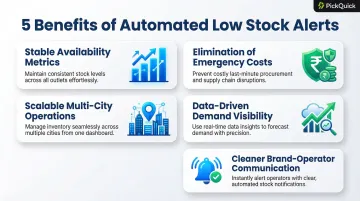
Benefit 5: Reduced Operational Noise and Cleaner Brand-Operator Communication
For brands working with QC operators or distribution partners, automated alerts replace ad-hoc WhatsApp messages and manual escalations with structured, data-backed notifications. Operations teams know exactly which SKU, which dark store, and what action is required — eliminating miscommunication and duplicated effort.
Instead of receiving panicked messages about stockouts after they've already impacted sales, teams receive proactive alerts with clear context and sufficient lead time to execute planned replenishment through established workflows.
Quick summary — what automated low stock alerts deliver:
- Stable fill rates that protect search placement and platform allocation
- Planned replenishment that avoids 50-100% same-day logistics premiums
- Multi-city monitoring from a single dashboard without adding headcount
- Historical demand data for smarter Min-Max and distributor planning
- Structured notifications that replace reactive, ad-hoc escalations
How Automated Low Stock Alerts Work: Core Components
Real-Time Inventory Monitoring
The foundation is continuous visibility into live stock levels at each dark store. This is achieved through integration with platform inventory APIs (Blinkit, Zepto, Swiggy Instamart, JioMart) or a centralized inventory management layer that aggregates data across platforms.
Stock levels update as orders are fulfilled, so the system always reflects current on-hand quantity. For brands working with Quick Commerce operators like PickQuick, this real-time visibility extends across 10,000+ pincodes with live dashboards tracking on-shelf availability (OSA) across every platform and dark store.
Threshold Configuration: Min-Max Per SKU Per Location
For each SKU at each dark store, operations teams set:
- Minimum stock level (reorder trigger): Calculated as average daily sales velocity × replenishment lead time (in days) + safety stock buffer
- Maximum stock level (replenishment target): Based on storage capacity, freshness constraints, and velocity patterns
These thresholds must reflect that SKU's daily velocity at that specific location. A high-velocity SKU in a dense urban dark store needs a higher minimum than the same SKU in a slower zone.
Example:
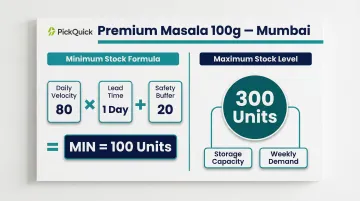
- SKU: Premium Masala 100g
- Dark Store: High-density Mumbai location
- Daily velocity: 80 units
- Replenishment lead time: 1 day
- Safety buffer: 20 units
- Min = (80 × 1) + 20 = 100 units
- Max = 300 units (based on storage capacity and weekly demand)
Brands managing operations at scale benefit from having their QC operator set and continuously optimize these parameters based on pincode-level demand data and velocity tracking.
Alert Delivery and Escalation
When stock hits the minimum threshold, the system fires an alert to the relevant operations stakeholder. Well-designed alert systems handle three delivery and escalation scenarios:
- Immediate notification: Dashboard alert, email, or in-app message to the assigned ops contact
- Time-based escalation: If unactioned within a defined window, the alert routes to a senior team member
- Automated trigger: High-priority stockouts can bypass manual action entirely and generate a replenishment request directly
Replenishment Workflow Integration
Tightly integrated implementations connect alerts directly to downstream replenishment workflows — automatically generating a transfer order from a regional warehouse to the dark store, or raising a purchase order to the local distributor. Detection triggers action without manual intervention at every step.
Platform-level tools support this further. Blinkit's Seller Hub provides Min-Max quantity suggestions for shipments, and Zepto's Atom portal delivers real-time, pincode-level performance data refreshed every minute — giving operations teams the signal they need to act fast.
Implementing Automated Low Stock Alerts: A Step-by-Step Guide
Step 1: Audit Your Current Inventory Visibility Gaps
Before setting up alerts, map where your inventory data currently lives and where the gaps are:
- List every active dark store location per platform
- Identify your top sellers by velocity (units sold per day per store)
- Document OOS events in the past 30-60 days
- Calculate current availability percentage by platform and store
This baseline makes threshold-setting meaningful rather than arbitrary — you cannot calibrate alerts without knowing where performance currently stands.
Step 2: Define SKU-Level Reorder Thresholds Per Location
Use your sales velocity data combined with typical replenishment lead time to calculate minimum stock levels:
Formula: Min = (Daily velocity × Lead time in days) + Safety buffer
Set maximum levels based on:
- Storage capacity constraints (dark stores are typically 800-1,500 sq ft)
- Freshness requirements (critical for dairy, bakery, perishables)
- Velocity patterns (high-velocity SKUs can justify higher Max)
- Platform-imposed limits (Max expands based on availability performance)
Perishable categories need an additional layer of judgment. A dairy SKU with 14 days of shelf life cannot carry the same Max as a masala SKU with 12 months — factor in expiry dates and rotation velocity before finalising thresholds.
Step 3: Integrate, Test, and Assign Ownership
Connect your alert system to your inventory data source (platform API integration or inventory management software). Run a test cycle:
- Simulate a threshold breach
- Verify the alert fires correctly
- Confirm it reaches the right person
- Test escalation workflow if no action is taken
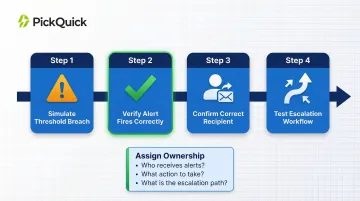
Assign clear ownership:
- Who receives which alerts?
- What action must they take?
- What is the escalation path if action is not taken within the defined time window?
Each alert needs a named owner — someone accountable for confirming the replenishment order, coordinating dispatch, and closing the inwarding loop. Unassigned alerts get ignored.
Frequently Asked Questions
What is the purpose of an inventory alert?
An inventory alert notifies operations teams when a SKU's stock level at a specific location falls below a minimum threshold, enabling proactive replenishment before a stockout occurs. This prevents lost sales and listing suppression on Quick Commerce platforms.
What are the benefits of auto replenishment?
Auto replenishment delivers four core advantages for QC brands:
- Eliminates manual stock monitoring across dark stores
- Protects platform rankings through consistent availability
- Reduces emergency restocking costs (which carry 50–100% premiums)
- Maintains multi-location presence without adding headcount
How does going out of stock affect a brand's ranking on QC platforms?
QC platforms use availability percentage as a ranking signal, so frequent OOS events suppress your product in search results and cut conversions. Even after restocking, ranking recovery takes 2–3 weeks of consistent in-stock performance — meaning every stockout compounds its own revenue damage.
What is a good reorder point for Quick Commerce dark stores?
Use this formula: average daily sales velocity × replenishment lead time (days) + safety stock buffer. For example, a SKU selling 20 units/day with a 2-day lead time and 10-unit buffer needs a reorder point of 50 units.
Can automated low stock alerts work across multiple QC platforms simultaneously?
Yes, a centralized inventory management layer or a QC operations partner can aggregate stock data across Blinkit, Zepto, Swiggy Instamart, and JioMart into a single alert system, so brands get a unified view without logging into each platform separately.