Introduction
On Quick Commerce platforms like Blinkit, Zepto, and Swiggy Instamart, a SKU going out of stock for even a few hours triggers algorithmic penalties that take 2-3 weeks to recover from. QC platform algorithms actively deprioritize products with frequent stockouts, causing immediate visibility drops and search ranking degradation.
The downstream costs compound quickly:
- 15-25% revenue leakage for brands with repeat stockout events
- Zepto's "Swap and Save" feature redirects customers to competitor products at checkout
- Recovery to pre-stockout search rankings typically requires sustained 3-week availability
Automation outcomes depend entirely on how thresholds are defined, how systems are connected, and how alerts are routed. Poorly configured automation causes over-ordering just as easily as stockouts.
This is especially true for perishable categories, where FSSAI mandates 30% remaining shelf life for e-commerce delivery — making excess inventory a direct liability rather than a safety buffer.
This guide covers exactly what automation involves in a QC context, the steps to set it up correctly, the parameters that determine success, and the mistakes that undermine results.
Key Takeaways
- Purchase order automation triggers a PO when stock falls below a predefined reorder point, eliminating manual intervention
- Alert thresholds must factor in lead time, demand velocity, and safety stock, not just minimum quantities
- Setup requires five steps: defining thresholds, configuring alerts, mapping supplier logic, integrating data systems, and monitoring performance
- Multi-platform QC operations require consolidated stock visibility—siloed Blinkit, Zepto, and Instamart data breaks automation
- Common failures: incorrect reorder calculations, missing approval workflows, and uniform rules applied across SKUs with different velocity profiles
How to Automate Purchase Orders and Low-Stock Alerts
Step 1: Define Reorder Points and Min-Max Stock Thresholds Per SKU
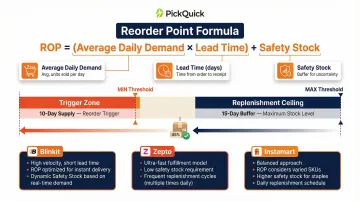
The reorder point (ROP) is the stock level that triggers a new order. The industry-standard formula is:
ROP = (Average Daily Demand × Lead Time) + Safety Stock
For QC dark stores, this calculation must happen at the dark store level, not just warehouse level. A brand averaging healthy stock across five cities may look fine nationally while individual dark stores in high-demand pincodes sit empty. Central dashboards miss this silent revenue leakage entirely.
Min-Max logic explained:
- Min = the threshold that triggers a PO
- Max = the ceiling the PO should replenish to
Both must reflect platform-specific demand velocity, not blended averages. Blinkit's dairy SKU velocity differs materially from the same product on Zepto or Instamart, requiring separate threshold calculations per platform.
The 15-day buffer rule: For high-velocity QC fulfillment, successful vendors maintain a minimum of 15 days of inventory at current sales velocity, with replenishment POs triggered when stock drops to 10 days of remaining supply.
Step 2: Configure Low-Stock Alert Rules and Notification Routing
Alert rules are configured in your inventory management system per SKU. For each SKU, define the threshold quantity, the alert level (dark store, city, or platform), and who receives notifications: procurement team, account manager, or automated system.
Implement tiered alerts:
- Warning threshold: 3 days of stock remaining (allows proactive ordering)
- Critical threshold: Less than 1 day of stock (requires emergency response)
This two-tier approach prevents teams from reacting to stockouts rather than preventing them. Research shows that up to 67% of system alerts get ignored due to noise and false positives, which is why threshold calibration determines whether your team stays responsive or goes numb to notifications.
Alert sensitivity by velocity category:
- High-velocity SKUs (dairy, staples): Trigger at 3-5 days remaining
- Medium-velocity SKUs (snacks, beverages): Trigger at 5-7 days remaining
- Low-velocity SKUs (specialty items): Trigger at 7-10 days remaining
Step 3: Set Up Automated PO Generation Logic and Supplier Mapping
Once an alert fires, the system should auto-generate a draft or confirmed PO using pre-mapped supplier data:
- Supplier name and contact details
- Minimum order quantity (MOQ)
- Lead time in days
- Pricing tiers
- Preferred delivery location (motherhub or dark store)
Not every PO should be auto-confirmed. Build approval tiers based on order risk:
- Auto-confirm: Low-value, routine reorders for established suppliers
- Manager approval: High-value orders, non-standard quantities, or new supplier relationships
Without these checkpoints, automation can generate duplicate orders, incorrect quantities, or POs placed against outdated supplier terms.
Step 4: Integrate Inventory Data Across Platforms and Supplier Systems
Automation breaks down when stock data is siloed. If Blinkit inventory, Zepto inventory, and warehouse stock are tracked in separate spreadsheets, alerts will be inaccurate and POs will be triggered based on incomplete information.
Integration requirements:
- Pull real-time or near-real-time stock data from each QC platform's seller portal or API
- Aggregate data into a single source of truth (unified inventory view)
- Push confirmed POs to supplier's order management system or ERP
- Maintain synchronized coordination between distributors, warehouses, and dark stores
For brands managing operations across 10,000+ pincodes with multiple regional suppliers, this integration complexity adds up fast. PickQuick's centralized control tower aggregates platform-level API integrations, real-time stock tracking, and automated PO processing in one place, so brands don't have to build this infrastructure from scratch.
Step 5: Monitor Automation Performance and Recalibrate Thresholds Regularly
Demand patterns shift seasonally, new cities and dark stores get added, and supplier lead times fluctuate. Thresholds set in January may be dangerously off by April. Review them monthly at minimum.
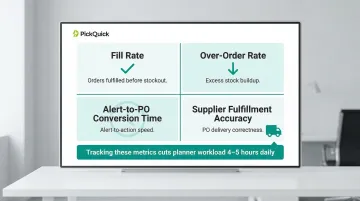
Track these metrics:
- Fill rate: Orders fulfilled before stockout occurs
- Over-order rate: Excess stock building up in dark stores
- Alert-to-PO conversion time: How quickly alerts trigger action
- Supplier fulfillment accuracy: Orders delivered correctly against auto-generated POs
Brands that consistently track these metrics can cut planner workload by 4-5 hours daily while reducing overstock and waste by up to 40%—gains that compound as you expand across more cities and dark stores.
What You Need Before Setting Up Automation
Preparation quality directly determines whether automation helps or creates new problems. Most failed implementations trace back to missing foundations, not technology limitations.
System and Data Requirements
Minimum requirement: A centralized inventory management system (or QC operator dashboard) that aggregates stock levels across all active dark stores and platforms in real time. Spreadsheet-based tracking cannot support reliable automation due to manual sync delays and version control issues.
Supplier data readiness: All suppliers must have confirmed and documented:
- Minimum order quantities (MOQs)
- Lead times in days
- Pricing tiers and volume discounts
- Delivery windows and cut-off times
Incomplete supplier records cause auto-generated POs to error or send incorrect quantities, triggering fulfillment delays and stockout penalties.
Operational Readiness
Brands expanding across multiple QC platforms need a clear owner for replenishment decisions — whether an internal ops team or an external operator. Without one, automation rules drift, stock thresholds go uncalibrated, and reorder triggers stop reflecting actual demand patterns.
For brands without in-house QC operations, partnering with a dedicated operator like PickQuick handles this layer directly. PickQuick manages Min-Max optimization, dark store replenishment, and supplier coordination across 10,000+ pincodes — so brands don't need to build this infrastructure before enabling automation.
Key Parameters That Affect Automation Performance
Automation quality is only as good as the input variables. Even a well-configured system will fail if underlying parameters are set incorrectly or not updated as conditions change.
Reorder Point Accuracy
The ROP is the single most important variable in any PO automation setup. Set it too low and products stock out before a replenishment order arrives. Set it too high and capital locks up in inventory that costs money just to sit there.
Inventory carrying costs run 20-30% of total inventory value annually — storage fees, capital costs, and shrinkage combined. On Blinkit, storage is charged at ₹1/unit/day, so an inflated ROP cuts directly into margins per unit stored.
The most common mistake is using static demand averages. Static averages hide variability, so the ROP looks correct on paper but fails during demand peaks or slow cycles.
Safety Stock Levels
Once ROP accuracy is established, safety stock determines how much buffer exists when reality diverges from the plan. It absorbs demand spikes and supplier delays — without it, even a correctly set ROP fails during variance.
The holding cost tradeoff is real, especially for perishables. In India, roughly 5-10% of milk supply is wasted annually, with up to 30% of that waste concentrated in summer months. Chilled dairy shrinkage during summer runs 1.5-3.5% of category throughput value.
Carrying too little, on the other hand, leaves the system vulnerable whenever demand spikes or a supplier misses a delivery window. Compliance adds another constraint:
- FSSAI requires food products delivered via e-commerce to carry at least 30% remaining shelf life (or 45 days minimum)
- Blinkit requires 90-120 days of remaining shelf life at the time of inwarding to avoid return penalties
Supplier Lead Time Variance
Safety stock calculations are only valid when lead time estimates are accurate. Most PO automation assumes a fixed lead time, but suppliers rarely deliver with perfect consistency — and in Indian e-grocery, variability is the norm, not the exception.
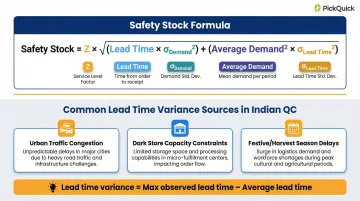
When both demand and supplier lead times vary, APICS/ASCM standards require combining the variances using the root-sum-of-squares method:
Safety Stock = Z × √[(Lead Time × σDemand²) + (Average Demand² × σLead Time²)]
Common sources of lead time variance in Indian QC include:
- Urban traffic congestion during peak hours
- Dark store capacity constraints at high-demand pincodes
- Supplier-side dispatch delays during festive or harvest seasons
Calculate lead time variance as the difference between your average and maximum observed lead time. Feed that figure directly into the formula above.
Alert Threshold Sensitivity
With lead time variance accounted for, the final variable is where exactly alerts fire. Set thresholds too conservatively — triggering at high stock levels — and teams hit alert fatigue and start ignoring notifications. Set them too aggressively, triggering only at near-zero stock, and the lead time window is already missed.
Calibrate threshold sensitivity per SKU velocity category using ABC/XYZ classification:
By Value (ABC):
- A-Items (high value): Tight tolerances (2-5%), weekly cycle counts, immediate human alerts
- C-Items (low value): Wider tolerances (10-20%), quarterly counts, automated replenishment
By Demand Variability (XYZ):
- X items: Stable demand (CV < 10%)
- Y items: Seasonal demand (CV 10-25%)
- Z items: Volatile demand (CV > 25%)
High-velocity AX items like dairy need earlier alert triggers than slow-moving CZ items to prevent revenue-impacting stockouts.
When Should You Automate Purchase Orders and Low-Stock Alerts?
Automation works best when the conditions are right — applied across the board without a clear framework, it can create as many problems as it solves.
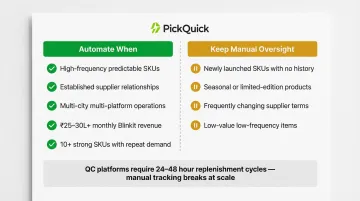
Ideal conditions for automation:
- High-frequency, predictable-demand SKUs with stable lead times
- Established supplier relationships with confirmed MOQs and delivery windows
- Multi-city, multi-platform operations where manual tracking is no longer feasible
- Brands generating ₹25-30 lakh monthly revenue on Blinkit or similar volume thresholds
- Sufficient order volume to justify setup investment (typically 10+ strong SKUs with repeat demand)
Traditional e-commerce replenishes every 7-15 days. Quick commerce platforms generate daily demand signals that require dark store replenishment every 24-48 hours — a cadence where manual spreadsheet tracking simply breaks down at scale.
At that volume, the numbers shift noticeably: brands running automated real-time sync typically cut manual reconciliation time by 70%, and automated forecasting brings order accuracy up by 20-25%.
That said, automation isn't universally appropriate. Some situations still call for manual oversight.
Situations where manual oversight is still better:
- Newly launched SKUs with no demand history or velocity data
- Seasonal or limited-edition products with irregular reorder patterns
- Situations where supplier terms change frequently and PO logic hasn't been updated
- Low-value, low-frequency items where automation overhead exceeds benefit
Common Mistakes When Setting Up PO and Low-Stock Alerts Automation
Most automation failures aren't technical — they come down to three setup errors that are easy to avoid once you know what to look for.
1. Setting thresholds without factoring in lead time
The most common mistake is setting the reorder point around a minimum comfort quantity instead of working backwards from supplier lead time. POs trigger too late, and the stockout happens during the replenishment window — the worst possible moment.
2. Using aggregated averages instead of location-level data
A brand averaging stock across five cities may look fine on paper while individual dark stores in specific pincodes are already empty. Centralized averages mask local imbalances. Because QC apps only surface inventory within a 2–3 km radius, customers in those pincodes hit a wall — causing silent revenue leakage that central dashboards never catch. Automation must run on granular, store-level data, not blended views.
3. Skipping approval workflows for auto-generated POs
Fully unchecked automation can result in duplicate orders, wrong quantities, or POs sent to the wrong supplier when records are outdated. Low-value routine reorders can be auto-confirmed. Non-standard orders — high-value SKUs, new supplier relationships, or unusual quantities — should route to a manager before submission.
Frequently Asked Questions
What is the difference between a low-stock alert and an automated purchase order?
A low-stock alert is a notification triggered when inventory falls below a set threshold, while an automated purchase order is the action that follows—the system generating and submitting a reorder to the supplier. The alert identifies the gap; the PO closes it.
How do you calculate the right reorder point for a Quick Commerce dark store SKU?
Use the formula: average daily sales multiplied by supplier lead time in days, plus safety stock. For QC operations, this calculation should be done at the dark store level, not the brand or warehouse level, since demand varies significantly by location.
Can purchase order automation work across multiple QC platforms like Blinkit, Zepto, Swiggy Instamart, and JioMart simultaneously?
Yes, it can—but only if stock data from all platforms is fed into a single unified inventory system. Siloed platform data means the automation is working with incomplete information and will generate inaccurate alerts or POs.
How do you prevent over-ordering when using automated POs?
Set a Max threshold that caps how much stock the PO refills to. Pair this with demand forecasting data so the system orders based on projected need, not a fixed quantity every time the alert fires.
What triggers a low-stock alert in an inventory management system?
An alert fires when real-time stock at a specific location hits or drops below the configured minimum threshold. This threshold is set in the inventory system or QC operator dashboard and can be customized per SKU or location.
What happens if a supplier cannot fulfill an auto-generated purchase order on time?
The system should have a fallback in place: an alternate supplier mapped for that SKU, an escalation alert to the procurement team, or a safety stock buffer that buys extra time. Single-supplier setups with no contingency are a common automation risk.