Introduction
If you're a regional FMCG brand or distributor with strong offline demand, JioMart is one of the few platforms where that existing pull actually translates online. Backed by Reliance Retail's network of 3,000+ stores across 5,000+ pincodes, the platform has scaled to 378 million registered customers and 1.6 million daily orders — making it a serious channel for MSMEs, distributors, and regional brands looking beyond metros.
The commercial terms are straightforward: zero registration fees and category commissions between 1–15%. Tier-2 and Tier-3 cities drive around 60% of JioMart's overall sales, which gives regional brands a genuine advantage here over national players.
That said, the registration process has real friction points. Mismatched business documents, incorrect GST details, and incomplete product catalogues are the most common reasons first-time sellers face delays or rejections.
For brands onboarding JioMart alongside Blinkit, Zepto, and Swiggy Instamart simultaneously, that friction multiplies fast — and timelines stretch to months. Quick Commerce operators like PickQuick cut that to weeks, managing documentation, catalogue setup, and dark store replenishment across all platforms under one partner instead of coordinating dozens of fragmented vendors.
Key Takeaways
- JioMart seller registration is completely free; sellers pay only category-based commissions (1–15%), fixed fees, and shipping charges per order
- Eligibility requires a GST-registered business — proprietorship, partnership, LLP, or Pvt Ltd all qualify
- Registration is invite-only: submit an Express Interest form, get an invitation code, then create and verify your account
- Products go live only after JioMart reviews listings; document mismatches between GST, PAN, and bank records cause most delays
- Regional brands can go live across Quick Commerce platforms in weeks, not months, by partnering with an operator like PickQuick
What Is JioMart and Who Can Sell on It?
JioMart is not a traditional e-commerce platform like Amazon or Flipkart. It operates as an Offline-to-Online (O2O) marketplace owned by Reliance Retail, fulfilling orders through a network of local stores, dark stores, and logistics partners rather than centralized warehouses.
This hybrid model cuts last-mile delivery distances — positioning JioMart to compete directly in the Quick Commerce segment alongside Blinkit, Zepto, and Swiggy Instamart.
Who Can Sell on JioMart?
JioMart accepts any enterprise compliant with Indian laws and holding relevant regulatory licenses. Eligible seller types include:
- Sole proprietors with valid business registration
- Partnership firms and LLPs
- MSMEs and SMEs registered under Udyam
- Private limited companies
- Manufacturers and distributors with GST registration
- D2C brand owners with trademark certificates or brand authorization
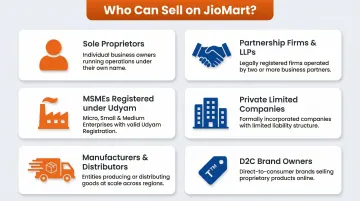
The platform operates on an invite-only model, meaning sellers must submit an Express Interest form and await approval before gaining access to the seller portal.
Allowed and Prohibited Product Categories
Allowed categories include:
- Groceries and daily essentials
- FMCG products (masalas, spices, staples)
- Fashion and lifestyle
- Consumer electronics
- Home and kitchen goods
- Personal care and beauty
- Handloom and handicrafts
Not everything qualifies, though. Prohibited categories include:
- Alcohol and tobacco products
- Prescription drugs and illegal medicines
- Hazardous or explosive materials
- Counterfeit or pirated goods
- Animals and wildlife products
- Offensive or obscene materials
Critical requirement: All sellers must have regular GST registration (composite GST is not accepted, except for sellers listing only Books).
Documents Required for JioMart Seller Registration
Even minor mismatches between your GST certificate, PAN card, and bank account details will trigger rejection or delays of several weeks. Get these aligned before you start the application.
Mandatory Documents
GSTIN and GST Certificate
- Valid regular GST registration (not composite)
- Business name must match exactly across all documents
PAN Card
- Individual PAN for sole proprietors
- Business PAN for partnerships, LLPs, and companies
Business Registration Proof
- Shop Act License
- Udyam registration certificate
- Certificate of Incorporation (for Pvt Ltd/LLP)
- Partnership deed (for partnership firms)
Bank Account Details with Cancelled Cheque
- Business bank account (not personal savings account)
- Cancelled cheque showing account number, IFSC, and account holder name
- Account holder name must match GST and PAN exactly
Business Address Proof
- Recent utility bill (electricity, water, gas)
- Rental agreement or property ownership documents
Supplementary Documents
Product Catalogue
- High-quality product images (front, back, barcode)
- Complete product specifications and descriptions
- MRP and weight/dimension details
Trademark Certificate or Brand Authorization Letter
- Required per JioMart's brand authorization policy for all branded product listings
- Retailer or distributor certificate if selling third-party brands
⚠️ Critical Warning: Verify that your business name and address appear identically on your GST certificate, PAN card, and bank account statement before submitting. This is the most common reason for registration delays. Minor variations like "Pvt Ltd" vs "Private Limited" or address formatting differences will trigger verification failure.
How to Register as a JioMart Seller: Step-by-Step Process
JioMart's registration is a multi-stage process that typically takes several working days. Unlike marketplaces with instant approval, JioMart manually reviews each application before granting access.
Step 1: Submit the Express Interest Form
Visit the JioMart Seller Portal and click "Seller Express Interest." You'll need to provide:
- Business name and legal entity type
- Email address and mobile number
- Confirmation of GST availability
- Business PIN code and service area
- MSME registration or trademark document availability
- 3–4 primary product categories you intend to sell
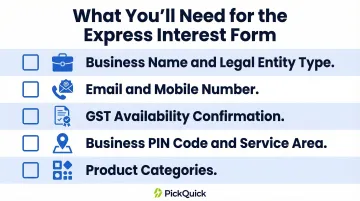
Submit the form and wait for JioMart's review team to assess your eligibility.
Step 2: Receive Approval and Invitation Code
If your Express Interest form is approved, JioMart will send a portal access link and a unique invitation code via email. This code is required to proceed — generic registration links will not work. Approval typically takes 2–7 business days depending on application volume.
Step 3: Create the Seller Account
Using the invitation code, accept JioMart's terms and conditions and verify your contact details:
- Verify email via OTP
- Verify mobile number via OTP
- Create your User ID and password
- Access the JioMart Seller Dashboard
Step 4: Complete Business and Bank Verification
Inside the Seller Dashboard, complete your profile across three areas:
Business Verification:
- Enter and validate PAN number
- Add CIN (Corporate Identification Number) if applicable
- Select business type and annual turnover range
- Submit GSTIN for automatic GST validation
Bank Verification:
- Provide bank account number and IFSC code
- Upload cancelled cheque image
- Wait for verification (1-3 business days)
Category and Pricing Selection:
- Choose product categories under "My Categories"
- Review commission structure in the Bill Plan section
- Note your category-specific commission rates and fees
Step 5: List Products and Go Live
Once your account is verified, navigate to Product > Add Product in the Seller Panel:
- Select the correct product category and subcategory
- Enter SEO-friendly product title with relevant keywords
- Write detailed product descriptions covering ingredients, usage instructions, and shelf life
- Upload multiple high-quality images (front of pack, back of pack, barcode visible)
- Add weight, dimensions, MRP, and selling price
- Submit for JioMart review
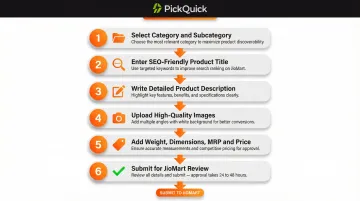
Products go live only after JioMart's catalogue team approves your listings. This review typically takes 2–5 business days. You'll receive email notifications when products are approved or if corrections are required.
JioMart Seller Fees and Commission Structure
JioMart's pricing model is transaction-based — you only pay when you make a sale. Registration and product listing are free.
Fee Components
JioMart doesn't publish exact commission rates publicly — check your specific rates under Profile > Bill Plan in the Seller Dashboard, as directed in official documentation. Typical commission ranges by category:
- Groceries and staples: ~3–6%
- FMCG and personal care: ~6–10%
- Fashion, lifestyle, and electronics: up to 15%
Beyond commission, three additional fees apply to every order:
| Fee Type | What It Covers |
|---|---|
| Fixed Fee | Per-order processing, payment gateway, and platform maintenance — based on product price slab |
| Shipping Fee | Calculated on actual or volumetric weight (whichever is higher); covers both forward and return logistics |
| Collection Fee | Currently ₹0 for most categories, though this can change with platform policy updates |
⚠️ Before finalizing your prices, log into the Seller Dashboard and review the complete fee breakdown under Bill Plan. Ignoring the full fee stack — commission + fixed fee + shipping + collection — is a common reason margins shrink faster than expected.
Calculate your landed cost per unit and confirm your selling price holds up after all platform fees are applied.
Benefits of Selling on JioMart and Tips to Maximize Sales
Core Advantages
Zero Onboarding Cost Registration and product listing are completely free, making JioMart accessible even for small regional brands and MSMEs with limited marketing budgets.
Massive Customer Access Reach 378 million registered customers across metros and Tier-2/3 cities, with non-metro regions contributing 60% of sales.
Reliance Brand Equity Tap into the trust and recognition of the Reliance Retail network, which operates 19,979 stores across multiple formats nationwide.
Built-in GST Compliance Automated GST-compliant invoicing eliminates manual paperwork and ensures regulatory adherence.
Dedicated Seller Support Access support via email (Seller.Support@jiomart.com), IVR helpline (1800 8896 000), and the Seller Enablement Network (SEN) for payment reconciliation and cataloging assistance.
Practical Tips for Listing Optimization
1. Keyword-Rich Titles and Descriptions Use specific product names, brand names, pack sizes, and relevant search terms. Example: "Goldie Turmeric Powder 200g | Pure Haldi | No Preservatives" performs better than "Turmeric Powder 200g."
2. Multiple High-Resolution Images Upload front pack, back pack with ingredients visible, product in use, and clear barcode images. High-quality visuals impact conversion rates.
3. Competitive Pricing Monitor similar listings within your category and price competitively. JioMart's O2O model favors bulk pack sizes and monthly purchasing patterns, so consider offering family packs or multi-unit bundles.
4. Inventory Accuracy Keep your inventory counts updated in the seller panel to avoid stockouts and order cancellations, which damage seller ratings.
Seller Best Practices
- Join promotional campaigns: JioMart runs regular sale events that drive traffic spikes — coordinate with the platform team and stock up ahead of these windows
- Meet dispatch timelines: Timely fulfillment protects your seller rating and improves repeat purchase rates; set only timelines you can consistently meet
- Gather reviews actively: Prompt satisfied customers to leave ratings — higher scores lift product visibility in search and category pages
Multi-Platform Quick Commerce Strategy
For regional brands in high-frequency categories like FMCG, groceries, masalas, dairy, and personal care, JioMart represents one part of a comprehensive Quick Commerce presence. The Indian quick commerce market reached USD $6–7 billion in 2024 and is projected to grow at over 40% annually, potentially reaching USD $27–50 billion by 2030.
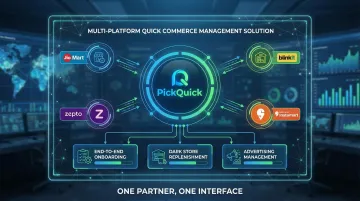
Brands scaling across Blinkit, Zepto, Swiggy Instamart, and JioMart simultaneously often work with specialized operators like PickQuick. PickQuick manages end-to-end onboarding, dark store replenishment, Min-Max optimization, advertising, and platform compliance across all major Quick Commerce platforms under a single operational model — compressing go-live timelines from months to weeks and removing the complexity of managing each platform independently.
Common Seller Mistakes to Avoid
- Providing misleading product information or incorrect specifications
- Ignoring buyer queries and customer service messages
- Delaying shipments beyond committed dispatch timelines
- Failing to check seller dashboards regularly for order updates
- Using incorrect, outdated, or mismatched documents during registration
- Listing products in wrong categories or with poor-quality images
- Neglecting inventory management and allowing frequent stockouts
Frequently Asked Questions
How do I register as a seller on JioMart?
Visit the JioMart Seller Portal, fill out the Express Interest form with your business and GST details, and wait for approval. Once approved, you'll receive an invitation code via email to complete account creation and business/bank verification before going live.
What documents are needed to sell on JioMart?
You'll need the following documents ready before applying:
- Valid GSTIN and GST certificate
- PAN card
- Business registration proof
- Bank account details with cancelled cheque
- Address proof
- Product catalogue
All details must match exactly across documents to avoid rejection.
What are the JioMart seller fees and commission rates?
Registration is free. Commissions range from 1–15% depending on category — groceries sit at the lower end, while fashion and electronics run higher — plus fixed fees and shipping charges per order. Check exact rates in the Bill Plan section of your Seller Dashboard.
How do I list products on JioMart?
Log into the Seller Panel and navigate to Product > Add Product. Select the correct category, enter SEO-friendly titles and descriptions with quality images and pricing, then submit for approval. JioMart reviews each listing before it goes live.
What are JioMart's seller policies?
JioMart requires sellers to:
- Maintain accurate, up-to-date listings
- Fulfill orders on time
- Comply with GST regulations
- Avoid prohibited product categories
- Meet returns and customer service standards
Review the latest policy details in your Seller Dashboard.