Introduction
JioMart has emerged as one of India's fastest-growing e-commerce platforms, backed by Reliance Retail's massive infrastructure and 349 million registered customers. The platform now handles over 1.6 million daily hyperlocal orders across 5,000+ pincodes and 1,000+ cities, with order growth reaching 360% year-over-year.
For FMCG brands, grocery sellers, and regional consumer goods manufacturers, JioMart is one of the strongest channels to access Reliance's trusted customer base and extensive supply chain network.
Yet many sellers—especially regional brands—struggle with JioMart's invite-based registration process. Unlike Amazon or Flipkart, you cannot simply sign up and start selling. JioMart requires sellers to submit an interest form, wait for approval, and obtain an invitation code before accessing the seller dashboard. Document mismatches, category-specific approvals, and unclear timelines often delay activation by weeks or even months.
This guide walks through the complete 2025 seller registration process so you know exactly what to expect at each stage. Here's what's covered:
- Eligibility criteria and required documents
- The invite-based approval process and how to navigate it
- Fee structures and category-specific requirements
- Listing best practices and account activation steps
- Common bottlenecks—and how to avoid them
Key Takeaways
- JioMart registration is invite-based—submit an interest form and wait for approval before accessing the seller dashboard
- Required documents: Valid GST number, PAN card, active bank account details, business address proof, and product-specific licenses (FSSAI for food)
- Approval typically takes a few days to several weeks depending on category demand and document verification speed
- Fee structure is account-specific: check "Profile > Bill Plan" in your dashboard for commission rates, fixed fees, and shipping charges
- Success depends on catalog quality, inventory availability, competitive pricing, and consistent dashboard monitoring
What Is JioMart and Why Should You Sell on It in 2025?
For FMCG brands with strong offline distribution, JioMart represents a direct path into India's largest retail-backed digital marketplace. Launched in 2020 by Reliance Retail, the platform has expanded well beyond groceries into electronics, fashion, personal care, and thousands of branded products. Its integration with 3,000+ Reliance physical stores enables same-day delivery across major metro areas — and gives sellers access to a customer base that already trusts the Reliance brand.
Why regional and FMCG brands should prioritize JioMart in 2025:
- 1.6 million daily hyperlocal orders and 349 million registered customers give sellers immediate access to high-intent buyers
- Reliance Fulfillment Centers (RFCs) handle storage, packing, and last-mile delivery — reducing logistics overhead for brand operators
- Commission rates are generally lower than competing platforms, though exact fees vary by account and category
- JioMart is actively onboarding sellers in Personal Care, Home & Kitchen, Snacks & Branded Foods, Premium Fruits, Beauty, and Staples — all high-frequency, repeat-purchase categories
JioMart is particularly well-suited for FMCG brands, grocery sellers, personal care, and regional consumer goods. Repeat purchase frequency in these categories runs roughly twice that of competing platforms, per Reliance's Q3 FY26 investor presentation — making it a strong fit for brands where velocity and basket loyalty drive growth.
Who Can Register: Eligibility Criteria and Required Documents
Eligibility Criteria
JioMart accepts any enterprise compliant with relevant Indian laws and holding regulatory licenses to operate. Eligible business types include:
- Individual proprietorships
- Partnerships and LLPs
- Private Limited companies
- Manufacturers, distributors, and wholesalers
- Direct-to-consumer (D2C) brands
Required Documents
| Document Type | Requirement Details |
|---|---|
| GST Registration | Regular GST required (NOT composite scheme). Exception applies only for Books category. |
| PAN Card | Individual or business PAN mandatory for tax compliance |
| Brand Authorization | Trademark Registry certificate OR Brand Authorization letter (retailer/distributor certificate) required for branded goods |
| FSSAI License | Mandatory for all food business operators |
| Bank Details | Active business bank account with cancelled cheque or bank statement for verification |
| Address Proof | Proof of business address and pickup/warehouse location |
| Identity Proof | Aadhaar card, Voter ID, or other government-issued ID |
| Company Registration | Incorporation certificate, partnership deed, or LLP agreement (if applicable) |
You need a pre-existing warehouse or pickup address, as JioMart's logistics partners will collect consignments from your location. Alternatively, you can use Reliance Fulfillment Centers (RFCs), where JioMart handles storage, packing, and shipping on your behalf.
GST Compliance Requirement
GST registration is legally mandatory for all e-commerce suppliers under Section 24(ix) of the CGST Act, 2017. If you sell through a platform that collects Tax Collected at Source (TCS), you must register for GST — regardless of your turnover.
The standard threshold exemption does not apply to marketplace sellers.
Current TCS and TDS rates (effective 2024-2025):
- TCS (Section 52 CGST): 0.5% (0.25% CGST + 0.25% SGST) effective July 10, 2024
- TDS (Section 194-O Income Tax): 0.1% effective October 1, 2024
JioMart Seller Registration: Step-by-Step Process
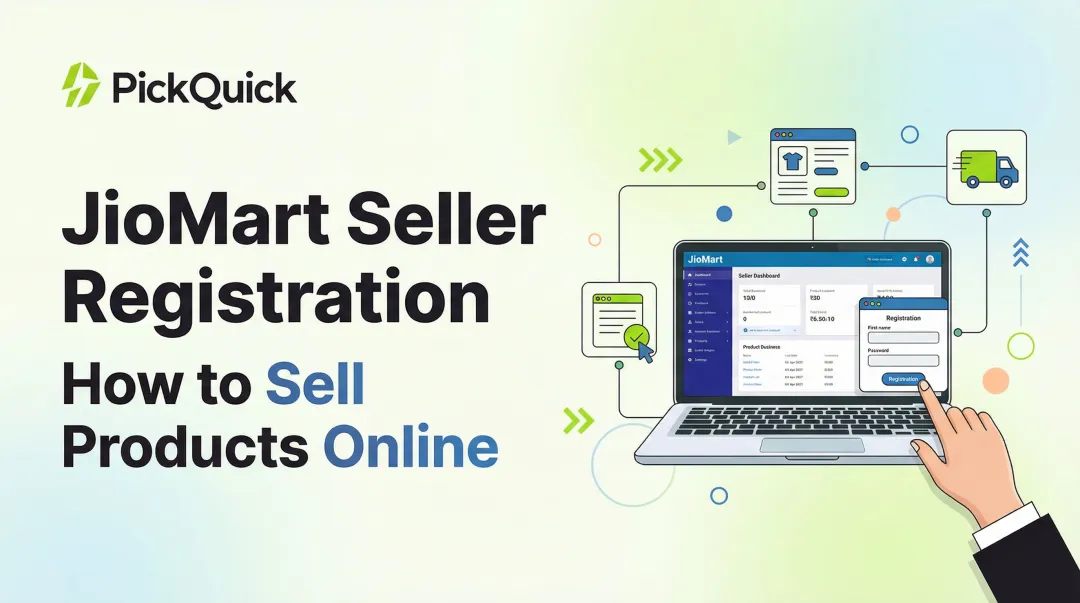
JioMart uses an invite-based onboarding model—sellers cannot register directly like on Amazon or Flipkart. The process starts with submitting an interest form and proceeds only after JioMart approves your application and sends an invitation code via email.
Step 1: Submit the Seller Interest Form
Visit seller.jiomart.com and click the "Seller Express Interest" form. Complete the following fields:
- Business name and contact person name
- Valid email ID and mobile number
- GST registration status (yes/no)
- Complete the CAPTCHA and click "Save & Continue"
On the next page, provide:
- Business PIN code and full address
- MSME registration or trademark documentation (if available)
- 3-4 product categories you plan to sell (choose from Books, Personal Care, Home & Kitchen, Pets, Premium Fruits, Snacks & Branded Foods, Beauty, Staples, Fruits & Vegetables, and others)
Submit the form and note your application reference number.
Step 2: Wait for Approval and Invitation Code
After submission, JioMart's seller support team reviews your application. Approval typically takes a few days to several weeks depending on:
- Category demand and current onboarding capacity
- Completeness and accuracy of submitted information
- Product category compliance requirements
- Document readiness for verification
JioMart does not publish a guaranteed approval timeline. Once approved, you will receive an email containing:
- A seller portal access link
- A unique invitation code
- Instructions to accept terms and conditions
Check your spam folder if you don't receive the email within two weeks. For status updates, contact seller.onboarding@jiomart.com or call 1800 8896 000.
Step 3: Create Your Seller Account
Click the invitation link in your approval email and complete the following:
- Accept JioMart's seller terms and conditions
- Enter your unique invitation code
- Fill in personal details (full name, mobile number, email address)
- Verify your mobile number and email via OTP (One-Time Password)
- Create a User ID and secure password for future logins
- Confirm the "I am the Primary User" checkbox
- Click "Create Account"
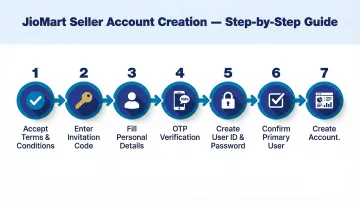
You will be redirected to the JioMart Seller Dashboard.
Step 4: Complete Company and Bank Details
Navigate through the dashboard to complete your business profile:
- Enter your Company PAN and CIN exactly as they appear on your registration documents
- Select your business type (proprietorship, partnership, LLP, or private limited) and provide estimated annual revenue
- Match your business address, GST number, and registered state to your GST certificate exactly
- Provide account holder name, account number, IFSC code, and bank name; upload a cancelled cheque or bank statement
Mismatched details are the most common cause of delayed account activation. Cross-check every field against your documents before submitting.
Step 5: Select Product Categories and Review Commission Plans
Navigate to the "My Categories" section and select 3-5 product categories that match your inventory. Choose carefully—your category selection determines the commission fees you'll pay per sale.
After selecting categories, visit the "Profile > Bill Plan" page to review:
- Commission fees applicable to your selected categories
- Fixed fees per order
- Shipping fee structure based on weight and order value
- Payment settlement days
Category selection is difficult to reverse once finalized, so confirm your choices align with your actual product portfolio before saving.
Step 6: Upload Documents and Await Account Activation
Upload all required documents through the seller dashboard:
- PAN card (clear, readable copy)
- GST registration certificate
- Cancelled cheque or bank statement
- Identity proof (Aadhaar/Voter ID)
- Business registration documents (incorporation certificate, partnership deed, etc.)
- Trademark certificate or brand authorization letter (for branded products)
- FSSAI license (for food products)
Use high-resolution scans throughout—blurry, incomplete, or mismatched documents are a common activation delay. Verify that names, addresses, and registration numbers are consistent across every file you upload.
Once JioMart verifies your documents, your seller account is activated and you can begin listing products. Verification typically takes 3–7 business days when documents are complete and accurate.
How to List Your Products on JioMart
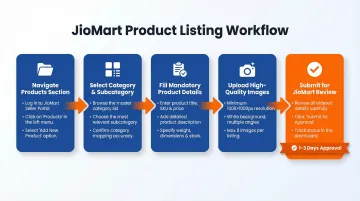
After account activation, follow this workflow to create product listings:
- Go to the "Products" section in your seller dashboard
- Click "Add Product"
- Select the appropriate category and subcategory
- Fill in all mandatory product details:
- Product title with relevant keywords
- Brand name and manufacturer details
- Detailed product description highlighting key features and specifications
- MRP (Maximum Retail Price) and your selling price
- GST percentage applicable to the product
- Country of origin
- Multiple high-quality product images
- Product weight and dimensions for shipping calculation
- Shelf life, ingredient list, and nutritional information (for FMCG/food products)
Filling in fields correctly is only half the job. What separates listings that convert from those that don't comes down to a few quality factors:
What makes a strong JioMart listing:
- Titles that include brand, product type, key feature, size/quantity, and variant (e.g., "Goldie Turmeric Powder | Pure Haldi | 200g Pack | Rich Aroma")
- Images on a clean white background, no watermarks, good lighting, product filling 70-85% of frame, shot from multiple angles
- Descriptions covering benefits, specifications, usage instructions, and selling points in scannable paragraphs
- Pricing that reflects competitor research while protecting your margins
A GS1 India study found that poor product data quality results in approximately ₹5,000 crore in annual revenue loss across Indian e-commerce. Specifically, 14% of SKUs fail an 80% data quality threshold, with 27% failing on completeness alone. Consumer-facing attributes — titles, images, and descriptions — account for the largest share of failures, directly reducing listing visibility and conversion rates.
JioMart reviews all listings before publishing them live. Expect 1-3 business days for approval if your listing meets quality standards.
Fulfillment Options
Choose the fulfillment method that matches your operational capacity:
1. Seller-Managed Shipping (Direct to Customer)
- You handle inventory storage, order packing, and handover to JioMart's logistics partners
- Logistics providers pick up packed orders from your warehouse and deliver to customers
- You maintain full control over inventory but bear responsibility for timely dispatch
- Best for sellers with existing warehouse infrastructure and logistics experience
2. JioMart Fulfillment (Reliance Fulfillment Centers - RFCs)
- Ship your products in bulk to JioMart's fulfillment centers
- JioMart handles storage, inventory management, order packing, and delivery
- Reduces your operational burden and may improve delivery speed
- Best for sellers wanting to minimize logistics complexity
3. Hybrid Model
- Combine both approaches — manage fast-moving SKUs yourself and store slow-movers at RFCs
- Optimize costs and control based on product characteristics
- Needs careful inventory planning across both channels
Managing Inventory and Orders
Once orders start coming in, the seller dashboard keeps everything visible in one place:
- Real-time order tracking: Monitor orders from placement through delivery
- Inventory updates: Keep stock levels current to prevent cancellations
- Order acceptance and dispatch management: Accept orders and update dispatch status within defined timelines
- Customer query handling: Respond to buyer questions and concerns promptly
Keep your stock levels updated at all times. Cancellations due to stockouts hurt your seller rating, push your listings down in search, and can trigger penalties or listing restrictions.
JioMart Seller Fees and Commission Structure
JioMart does not publicly publish a category-by-category commission rate table. All fee structures are account-specific and must be viewed within your authenticated seller dashboard under "Profile > Bill Plan".
Fee Components
| Fee Type | How It's Charged | Notes |
|---|---|---|
| Commission Fee | % of transaction value | Varies by category; set by JioMart |
| Fixed Fee | Flat amount per order | Added on top of commission |
| Shipping Fee | Based on weight + delivery distance | May be waived above certain order values |
| Collection Fee | Not charged separately | Included in other fee components |
Example Fee Calculation (Hypothetical):
For example, if you sell a ₹500 personal care product, your deductions might look like this:
- Transaction Value: ₹500
- Commission (assumed 10%): ₹50
- Fixed Fee (assumed ₹15 per order): ₹15
- Shipping Fee (assumed ₹25): ₹25
- Total Deductions: ₹90
- Net Payout to Seller: ₹410
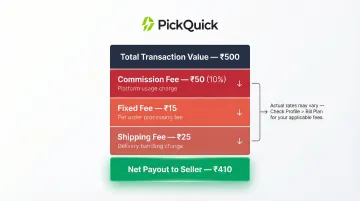
Important: Factor all three fee components into your pricing to protect margins. Rates can change, so review your "Bill Plan" dashboard regularly and confirm category-specific rates at registration.
After Registration: Common Challenges and Growth Tips
Common Post-Registration Challenges
Delayed account approval due to document mismatches
- Ensure PAN, GST, and bank account details match exactly across all documents
- Upload clear, high-resolution scans
- Double-check spelling of business name, address, and proprietor/director names
Low initial visibility in crowded categories
- Optimize product listings with relevant keywords in titles and descriptions
- Maintain competitive pricing to appear in price-filtered searches
- Ensure high-quality images that stand out in search results
Logistics quality variability in remote pincodes
- Monitor delivery performance metrics closely
- Work with JioMart support to identify and resolve recurring delivery issues
- Consider using Reliance Fulfillment Centers for better delivery reliability in remote areas
Catalog rejections and listing delays
- Follow JioMart's cataloging standards exactly: white background images, complete mandatory fields, accurate pack sizes and weights
- For food products, include FSSAI number, shelf life, ingredient list, and manufacturing date
- Avoid blurry images, text overlays, or watermarks
Actionable Growth Tips for JioMart Sellers
Join Promotional Events and Festive Sales
Reliance Retail runs campaigns like Tyohaar Ready Sale, Bestival Sale, and JioUtsav to pull in high-intent shoppers. Sellers who participate with competitive offers consistently see stronger visibility and measurable sales spikes during these windows.
Use Dashboard Analytics to Sharpen Pricing
Monitor conversion rates, views-to-orders ratio, and category benchmarks regularly. If traffic is healthy but conversions are low, test a price adjustment or rewrite the product description. Prioritize inventory for your top-performing SKUs.
Prevent Stockouts Before They Happen
Stockouts lower your search ranking and hurt seller ratings. Set up inventory alerts in your dashboard, maintain safety stock for fast-moving products, and coordinate closely with your warehouse team on restocking timelines.
Protect Your Seller Rating
JioMart tracks cancellation rates, return ratios, complaint resolution speed, and shipping punctuality. Consistent underperformance leads to penalties, listing restrictions, or suspension. Respond to customer inquiries within 24 hours and resolve complaints before they escalate.
Scaling Across Quick Commerce Platforms with PickQuick
Managing a single JioMart account is one thing. Running simultaneous operations across JioMart, Blinkit, Zepto, and Swiggy Instamart is a different challenge entirely—one that demands platform-specific onboarding, dark store replenishment cycles, Min-Max inventory optimization, and compliance documentation across four separate systems.
Regional FMCG brands with ₹5-7 crore in monthly offline demand typically lack the in-house bandwidth to manage this without a dedicated team.
PickQuick operates as a Quick Commerce operator handling end-to-end platform operations for regional FMCG brands. The service covers:
- JioMart seller onboarding, listing creation, and SKU mapping
- Inventory placement across fulfillment centers
- PO and dispatch coordination
- Promotional campaign management across platforms
PickQuick currently manages 10,000+ pincodes across India for 25+ brands—including Nandini Dairy, Goldie Masala, Vasant Masala, and Aavin Dairy—with real-time pincode-level visibility, automated replenishment, and unified analytics. Brands go live in weeks, not months, without building internal QC teams.
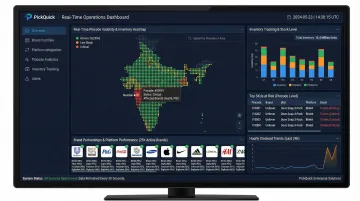
For brands with established offline distribution ready to expand into quick commerce, partnering with a dedicated operator removes the fragmented vendor management, document delays, and inventory coordination issues that slow independent sellers. Contact swapnil@letspickquick.com or visit letspickquick.com to explore multi-platform QC management.
Frequently Asked Questions
What documents are required to register as a seller on JioMart in 2025?
Core documents include PAN card, GST certificate (regular, not composite), Aadhaar or government-issued ID, cancelled cheque or bank statement, and business registration documents (if applicable). Food sellers additionally require a valid FSSAI license.
Is GST mandatory to sell on JioMart?
Yes. GST registration is legally mandatory for all e-commerce marketplace sellers under Section 24(ix) of the CGST Act, 2017. The turnover threshold exemption does not apply to sellers on platforms that collect Tax Collected at Source.
How long does JioMart seller onboarding take?
Approval of the seller interest form typically takes 3 days to 4 weeks depending on category demand, current onboarding capacity, and document verification speed. Sellers can expedite the process by ensuring all documents are complete, accurate, and match exactly across submissions.
How much commission does JioMart charge sellers?
JioMart does not publish commission rates publicly. Fee structures are account-specific and visible only in your seller dashboard under "Profile > Bill Plan." These typically include category-dependent commission percentages, fixed per-item fees, and shipping charges based on weight and location.
How do I download GST reports from JioMart?
GST reports can be downloaded directly from the JioMart Seller Dashboard under the payments or reports section. These reports contain transaction details needed for monthly GST filing and reconciliation with your books.
Who delivers JioMart orders?
JioMart uses Reliance Retail's supply chain alongside third-party logistics partners for delivery. Sellers on Reliance Fulfillment Centers get end-to-end handling by the platform; self-fulfillment sellers coordinate with JioMart's logistics partners for pickup and last-mile delivery.