Introduction
Quick commerce has fundamentally reshaped how Indian consumers shop. Delivery in 10-20 minutes isn't a novelty anymore—it's the baseline expectation, particularly in urban and semi-urban markets where platforms like Blinkit have turned instant gratification into habit. As of Q1FY26, Blinkit's Gross Order Value surged 140% year-on-year to ₹11,821 crore, officially surpassing Zomato's core food delivery business. The platform now serves 16.9 million monthly transacting customers, with an average order frequency of 3.4x per customer monthly.
Blinkit isn't just for grocery giants. Regional masala brands, dairy companies, D2C snack labels, and category leaders across India are now using it as a primary growth channel. The channel is growing at 45% CAGR and is projected to reach $35-40 billion by 2030.
Onboarding, however, is nothing like Amazon or Flipkart. You can't self-register and go live. You need Category Manager approval, state-level APOB registrations, and inventory stocked at Blinkit's dark stores before a single order is fulfilled.
This guide walks you through every step—from eligibility and registration to fees, APOB compliance, and post-launch growth tactics—so you can navigate Blinkit's onboarding efficiently and start scaling.
Key Takeaways
- Blinkit is a curated marketplace: apply, complete NPI approval, register APOBs per state, and go live
- Required documents: GST, PAN, FSSAI (for food/beverage), bank details, brand authorization, and GS1 barcodes
- Commission runs 2–18% by price tier, plus fees for inwarding, storage, and returns
- Onboarding takes 20-45 days; APOB registration adds time if not started early
- Scale through sponsored ads, stock availability, Category Manager alignment, and city expansion
What Is Blinkit and Why Should You Sell on It in 2026?
India's Leading Quick Commerce Platform
Blinkit (formerly Grofers) is India's dominant quick-commerce platform and a Zomato company. It runs on a dark store model (hyperlocal warehouses within 2-3 km of customers), enabling 10-20 minute delivery across major cities. As of Q2FY26, Blinkit operates 1,816 dark stores, targeting 2,100 by December 2025 and 3,000 by March 2027.
That scale matters: quick commerce now accounts for over 66% of all e-grocery orders in India, with Blinkit leading the charge. The sector is expanding at a 45% compound annual growth rate — and for high-frequency FMCG brands, that's where shelf space is shifting.
Why Blinkit Works for High-Frequency Brands
Blinkit attracts customers with immediate purchase intent. Unlike traditional e-commerce where consumers browse and compare, Blinkit users order to fulfill an urgent need — milk for morning tea, snacks for movie night, masalas for dinner. That urgency translates directly into seller metrics:
- Higher repeat rates: Customers order 3.4x per month on average
- Fast stock turns: High-frequency categories see inventory rotate within days
- Strong conversion: Search-to-purchase conversion is higher than traditional e-commerce due to urgency
The opportunity is real — but the operating model is nothing like Amazon or Flipkart.
How Blinkit Differs from Traditional E-Commerce
Selling on Blinkit requires a fundamentally different approach:
- No self-fulfillment: You don't ship orders. Inventory must be stocked at Blinkit's dark stores
- No plug-and-play listing: A Category Manager must approve every SKU
- Inventory-led operations: Products only appear in pin codes where dark stores have stock
- Curated marketplace: Not every brand or category gets approved
Getting approved — and staying on shelf — comes down to supply consistency, freshness compliance, and proven demand in your category.
Who Can Sell on Blinkit and What Do You Need?
Eligible Seller Types
Blinkit accepts:
- Manufacturers and brand owners
- Authorized distributors with brand authorization letters
- Importers with proper documentation
- D2C brands with proven demand
Important: Blinkit follows a curated model. Not every applicant gets approved. Priority goes to brands in high-demand categories with demonstrated supply capability and consistent replenishment discipline.
Mandatory Documentation
| Document | Requirement | Notes |
|---|---|---|
| GST Certificate | Mandatory | Name must match PAN and bank account |
| PAN Card | Mandatory | Individual or business PAN accepted |
| FSSAI License | Mandatory for food/beverage | FSSAI explicitly mandates that e-commerce platforms cannot list food businesses without valid FSSAI registration |
| Bank Account Details | Mandatory | Cancelled cheque required for verification |
| Brand Authorization Letter | Required if not brand owner | Authorized distributors must provide this |
| GS1 Barcode | Mandatory for all SKUs | GS1 India is the only authorized provider of '890' barcodes |
| Trademark Certificate | If applicable | Recommended for brand protection |
Additional Compliance Requirements
Two compliance areas catch most sellers off guard before they even reach a dark store:
- Shelf life: FSSAI requires food products to have minimum 30% remaining shelf life or at least 45 days before expiry at delivery. Blinkit's standard is stricter — stock must have 90+ days remaining shelf life at inwarding.
- Barcodes: Every SKU needs GS1-standard barcodes for accurate warehouse scanning. Products without valid barcodes face inwarding rejections and delays.
Before You Apply: Check Serviceability
Getting your documents in order is only half the work. Blinkit is also selective about which pin codes and categories accept new sellers — so verify fit before you apply:
- Verify your category is currently open for new brands
- Confirm Blinkit operates dark stores in your target cities
- Ensure your pack sizes, pricing, and supply capacity align with platform requirements
Category Managers weigh both demand fit and operational readiness — brands with proven offline distribution in the target city typically get through faster.
How to Get on Blinkit: The Complete Onboarding Process
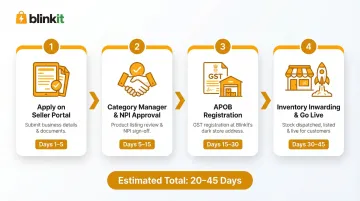
Unlike Amazon or Flipkart, you cannot self-onboard on Blinkit. The process involves four sequential stages: application, Category Manager engagement, product approval, and APOB + inventory setup. Each must be completed before moving to the next.
Step 1: Apply on the Blinkit Seller Portal
Visit the official Blinkit seller registration portal, complete your business information (brand name, contact details, category), and upload required documents. Approval typically takes 20-45 days from submission.
Document accuracy is non-negotiable — any mismatch between GST name, PAN, and bank account details triggers rejection. Common mistakes include:
- GST registered under proprietor name but bank account under company name
- PAN not matching GST registration
- FSSAI license expired or under different entity name
Have your CA cross-verify all three documents against each other before submission — this single check eliminates most rejection causes.
Step 2: Category Manager Assignment and NPI
Once approved, Blinkit assigns a Category Manager (CM) who:
- Approves which SKUs go live
- Negotiates margins and trading terms
- Guides on pack sizes and pricing strategy
- Schedules promotional campaigns
Without CM sign-off, no products go live. CMs who hear from you regularly prioritize your SKU expansion requests — brands that stay in active contact see faster listings, better placement, and earlier campaign access.
For each SKU, the NPI (New Product Introduction) submission requires:
- SKU name and dimensions
- MRP and selling price
- Ingredients/nutritional information
- GS1 barcode (UPC/EAN)
- High-quality product images:
- Front of Pack (FOP)
- Back of Pack (BOP) showing regulatory info
- Picker Image (how warehouse staff see it)
- FSSAI Image (license number visible on packaging)
Blinkit takes 3-7 days to approve each SKU batch. Submit your top 3-5 hero SKUs first rather than your entire catalog — focused launches consistently outperform broad ones.
Step 3: APOB Registration — The Step Most Sellers Miss
Additional Place of Business (APOB) is a GST compliance requirement that most first-time sellers overlook until it stalls their launch. Since Blinkit warehouses operate across multiple states, you must add each warehouse address as an APOB in your GST registration to legally supply goods to that state.
In September 2025, the CBIC issued Circular F. No. CBIC-20016/75/2025-GST/1025, confirming that storing goods in a third-party warehouse in another state creates a "place of business" requiring separate GST registration. Interstate movement requires tax invoices and e-way bills.
Without active APOB registrations:
- Blinkit cannot issue Purchase Orders for that region
- Warehouses will reject your stock
- You cannot legally generate tax invoices for that state's supply
APOB approval varies by state — typically 2-4 weeks per state. For brands targeting Delhi NCR, Mumbai, Bengaluru, and Hyderabad, that means separate filings for each state, running in parallel.
Start APOB filings the moment CM approval comes through. Waiting until inventory is ready is the single most common cause of launch delays.
Step 4: Inventory Inwarding and Going Live
Once APOBs are active, the final stage moves quickly — but only if your inventory meets Blinkit's compliance requirements from day one.
- Blinkit issues Purchase Orders based on demand signals from dark stores
- You dispatch inventory to assigned regional warehouses within the response window
- Inwarding team verifies:
- Packaging and labeling compliance
- Barcode scannability
- Quantity accuracy
- Shelf life (minimum 90 days remaining)
- Stock is distributed across dark stores in that region
- Products go live on the app in those pin codes
Rejections at inwarding trigger Return-to-Vendor (RTV) charges of ₹50 per item and push your launch back by weeks. They happen when:
- Shelf life is under 90 days
- Barcodes don't scan properly
- Packaging is damaged
- Quantities don't match PO
How to Get on Blinkit Faster: Operator-Led Onboarding
Scaling to 5-10 cities on quick commerce simultaneously is operationally intensive. APOB filings, CM negotiations, NPI submissions, and multi-city inventory coordination compound quickly — most brands don't have the internal bandwidth to handle all of it at once:
- Packaging compliance verification
- GS1 barcode certification
- Professional product imaging
- Multi-platform SKU mapping
- State-level APOB filings
- Dark store replenishment coordination
This is where end-to-end Quick Commerce operators like PickQuick cut go-live timelines significantly. With pre-existing operator relationships and state-level infrastructure already in place, brands go live across platforms in weeks rather than months.
PickQuick covers the full operational scope: documentation, CM engagement, APOB management, and dark store replenishment — delivering 3-5x faster QC go-live with far less internal resource drain.
For established brands generating ₹5-7 crore/month in offline demand or ₹25-30 lakh/month on Blinkit, operator-led onboarding eliminates approval delays and accelerates multi-city expansion.
Understanding Blinkit's Commission, Fees, and Payouts
Variable Commission Structure
In March 2025, Blinkit shifted from flat category rates to a variable commission model based on Average Selling Price (ASP):
| Selling Price | Commission Rate |
|---|---|
| < ₹500 | 2% |
| ₹500 – ₹700 | 6% |
| ₹700 – ₹1,200 | Negotiated (contact Category Manager) |
| > ₹1,200 | 18% |
Important: Exact rates are negotiated with your Category Manager and can vary by brand, city, and volume commitments. The variable structure means pricing strategy directly impacts your commission cost—a product priced at ₹499 pays 2% commission, while the same product at ₹501 pays 6%.
Operational Fees Beyond Commission
| Fee Type | Cost | When Charged |
|---|---|---|
| Inwarding Fee | ₹5 per unit | When stock arrives at warehouse |
| Storage Fee | ₹1 per unit/day (Days 1–30) ₹1.25 per unit/day (Days 31–60) ₹1.50 per unit/day (60+ days) |
For slow-moving inventory |
| Fulfillment Fee | ₹50 per order | Per delivered order |
| RTV (Return to Vendor) | ₹50 per item | For seller-attributed errors (damaged goods, shelf life issues) |
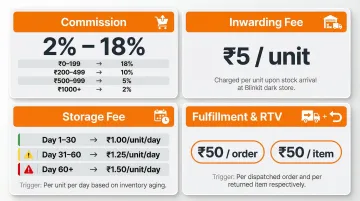
Critical insight: Storage fees escalate sharply for aging inventory. A slow-moving SKU sitting for 90 days accumulates ₹112.50 in storage fees alone (₹30 + ₹37.50 + ₹45), which can consume 15–25% of gross margins on lower-priced items.
Payout Cycle
Blinkit processes payouts twice monthly: on the nearest weekday to the 1st and 15th. Each payout deducts the following from your gross sales:
- Sales revenue (forward orders)
- Commission, fulfillment, inwarding, and storage fees
- Returns and Credit/Debit Notes (CN/DN)
- Loss/damage compensation (60–80% depending on category)
- Any other platform adjustments
The Seller Hub dashboard provides visibility into completed orders, earnings, deductions, and settlement timelines.
Pricing Strategy Considerations
To remain profitable:
- Calculate total fees before setting MRP: Account for commission, inwarding, fulfillment, and expected storage
- Compare against offline pricing: Avoid channel conflict with traditional trade
- Monitor competitor pricing: Blinkit is highly price-sensitive; consumers compare across brands instantly
- Test pricing tiers: Small price changes can shift commission brackets significantly
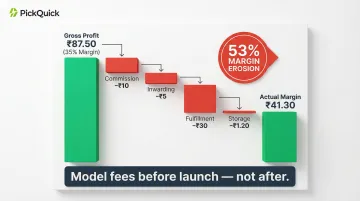
Here's what that looks like in practice. A ₹250 masala product with 35% retail margin (₹87.50 gross profit) faces:
- Commission (4%): –₹10
- Inwarding: –₹5
- Fulfillment: –₹30
- Storage (20-day average): –₹1.20
- Total fees: –₹46.20
- Actual margin: ₹41.30 (53% margin erosion)
Model this before launch — not after. A 53% margin erosion on a ₹250 SKU is recoverable if caught early; it's a write-off if discovered three months in.
How to Grow Your Sales on Blinkit After Going Live
Advertising Tools Available
Sponsored Product Ads: Push SKUs to top of search results and category pages. Most effective for new launches and competitive categories. Budget indicatively starts at ₹25,000-50,000/month for new brands.
App Banner Placements: Home screen or category-level banners for brand awareness campaigns. Higher cost but strong visibility.
Combo Offers and Flash Deals: Bundle SKUs or run limited-time deals. Works best for snacks, beverages, and daily essentials.
Brand Central Portal: Blinkit's self-serve ad platform (brands.blinkit.com) allows campaign creation, budget setting, and real-time performance tracking.
Critical rule: Blinkit's ad system is strictly inventory-led. Sponsored products only appear in pin codes where the product is physically stocked in the nearest dark store. If a dark store is out of stock, ads won't show in that area regardless of budget allocated.
Operational Fundamentals That Drive Growth
Stock Availability is the Single Biggest Growth Lever: Blinkit mandates >90% fill rate. Dropping below 80% triggers algorithmic demotion—search rankings drop, ad visibility reduces, and listings may be removed from active pin codes entirely.
Track These Metrics Weekly:
- Out-of-Stock (OOS) rate per dark store
- Return-to-Vendor (RTV) rate
- Shelf life remaining on dispatched inventory (maintain 90-120 days)
- Purchase Order response time (faster confirmation improves platform trust)
Start Small, Scale Smart: Launch with 3-5 best-selling SKUs rather than your entire catalog. Prove velocity and fill rate before expanding.
Once your operational fundamentals are stable, the next lever is geographic expansion—and that's where city-level strategy matters.
City-Level and Multi-City Scaling Strategy
Blinkit performance varies significantly by city and pin code — demand for a masala brand in Karnataka looks very different from Delhi NCR. To scale effectively:
- Analyze dark store-level performance: Use Seller Hub data to identify which stores drive highest velocity. Expand inventory depth there first.
- Participate in city-specific campaigns: Blinkit runs seasonal and regional promotions. Align with your Category Manager to get included.
- Expand to new cities gradually: Stabilize supply in 2-3 cities first. Expand only once fill rates and RTV metrics are consistently healthy.
- Read regional demand signals: Blinkit uses "Assortment Science" to match inventory to neighborhood-level patterns. A SKU performing well in one city may need a different pack size or price point in another.
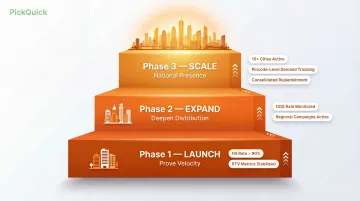
For brands managing 10+ cities simultaneously, pincode-level demand tracking and consolidated replenishment planning become non-negotiable. PickQuick handles exactly this — tracking availability across 10,000+ pincodes in real time and managing replenishment across all active dark stores, so brands don't lose sales to stockouts in cities they can't monitor manually.
Frequently Asked Questions
How do I start selling on Blinkit?
Apply on the Blinkit seller portal and submit required documents (GST, PAN, FSSAI, bank details). Once a Category Manager is assigned, complete NPI for product approvals, register APOBs for target states, and dispatch inventory to go live. The full process typically takes 20-45 days.
What items can be sold on Blinkit?
Blinkit supports groceries, packaged foods, dairy, snacks, personal care, home essentials, and health supplements. The platform follows a curated model—not all categories or SKUs are eligible, and certain restricted items (such as tobacco) require compliance with additional conditions.
How much does Blinkit charge sellers?
Commission ranges from 2-18% depending on selling price tier, finalized with your Category Manager. Additional fees include inwarding (₹5/unit), storage (₹1-1.50/unit/day), fulfillment (₹50/order), and RTV charges (₹50/item). Factor all fees into pricing before going live.
How long does Blinkit registration take?
Overall onboarding typically takes 20-45 days from application to going live. APOB registration (required for each state) can add 2-4 weeks per state if not initiated early. Brands targeting multiple cities should start APOB filings immediately after Category Manager approval.
How much does it cost to advertise on Blinkit?
New brands typically start with ₹25,000-50,000/month for sponsored ads; scaling brands often allocate ₹1-3 lakh/month or more. One critical constraint: ads only show in pin codes where inventory is already stocked, so availability must come first.
How do I grow my sales on Blinkit?
Maintain consistent stock availability (>90% fill rate), run sponsored ads during high-demand periods, participate in platform promotions, start with best-selling SKUs, act on Category Manager feedback, and monitor OOS and RTV rates weekly. Stockouts are the biggest growth killer—prioritize replenishment discipline above all else.