For regional FMCG brands scaling from offline distribution to Quick Commerce platforms, GS1 labeling compliance represents an invisible gate that determines whether products get listed, inbound-scanned, and shelved—or flagged for return. This compliance requirement operates silently in the background until it becomes the bottleneck that delays platform approvals, blocks dark store expansion, or generates costly chargebacks.
This guide covers the GS1 identifier hierarchy, what belongs on a compliant label, print quality and placement specifications, how to register with GS1 India, and the most common compliance failures to avoid before your first shipment.
Key Takeaways
- GS1 barcodes are the global standard for identifying products and logistics units across retail and Quick Commerce supply chains
- Each product needs a GTIN (typically EAN-13 in India) for item-level identification
- Each shipment carton or pallet requires an SSCC encoded in a GS1-128 barcode
- GS1 labels follow a three-block structure (top, middle, bottom); only the bottom block with barcode and HRI is mandatory
- Barcode quality, sizing, and placement matter as much as data accuracy—platforms reject barcodes that won't scan
- Register through GS1 India to obtain a Company Prefix, which unlocks the ability to generate all valid GTINs and SSCCs
The GS1 Barcode Identifier Hierarchy: What Each Code Does
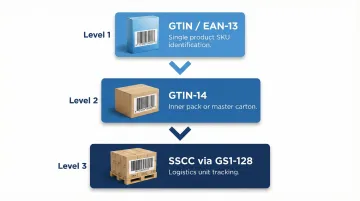
GS1 uses a layered system of identifiers, each operating at a different level of the supply chain—product, case, and shipment. Confusing which identifier belongs where ranks among the most common labeling errors regional brands make during platform onboarding.
EAN-13 and the GTIN
EAN-13 is the product-level barcode used across India and most of the world (the North American equivalent is UPC-A). It encodes the Global Trade Item Number (GTIN)—a globally unique 14-digit identifier assigned to each distinct product SKU.
The GTIN identifies the product itself—a 500g pack of garam masala, for instance—not its location or which physical unit it is. Each variant requires its own unique GTIN:
- Different pack sizes (100g vs. 200g) need separate GTINs
- Different flavours or formulations need separate GTINs
- Different pack counts (single vs. multipack) need separate GTINs
GTIN-14 for Case/Carton Level
GTIN-14 identifies a case or inner pack—for example, a carton containing 12 units of Product X. This allows trading partners to identify case contents without opening the carton, which speeds up receiving and putaway operations at distribution centres.
The GTIN-14 structure includes a packaging indicator digit that prefixes the product GTIN. This single-digit prefix differentiates the base consumer unit from its various packaging configurations (inner packs, master cartons, display-ready trays).
SSCC for Logistics Units
Once you move above case level to full pallets and outbound shipments, the identifier changes. The Serial Shipping Container Code (SSCC) is an 18-digit number that uniquely identifies one specific physical carton or pallet anywhere in the global supply chain. Reusing or duplicating an SSCC causes reconciliation failures at the receiving platform—each logistics unit needs its own.
SSCC structure breakdown:
- Extension digit (1 digit)
- GS1 Company Prefix (7-10 digits, assigned by GS1 India)
- Serial Reference (unique number assigned sequentially by your WMS or ERP)
- Check Digit (calculated via Modulo 10 algorithm)
SSCCs are generated sequentially by the shipper's warehouse management system or ERP at the point of dispatch. Once printed, that SSCC must match the dispatch advice or ASN sent electronically to the receiving platform. Any mismatch triggers a receiving exception.
GS1-128 Barcode Symbology
GS1-128 (formerly called UCC-128) is not an identifier—it's a barcode symbology, the visual encoding format used to represent SSCCs and other supply chain data on logistics labels. When platforms say they require a "GS1-128 label," they mean labels printed in this symbology.
GS1-128 barcodes use Application Identifiers (AIs) to signal what type of data follows. This lets a single barcode carry multiple data fields—SSCC, batch number, expiry date, product GTIN—in one scan. For brands shipping to Blinkit or Zepto dark stores, this means fewer labels per carton and faster inbound processing at the receiving end.
Anatomy of a GS1 Compliant Label
The GS1 Logistic Label structure contains two forms of information: data for people (human-readable text) and data for machines (barcodes). Both serve distinct functions at different points in the supply chain—warehouse staff read text, scanners read barcodes.
The Three Building Blocks
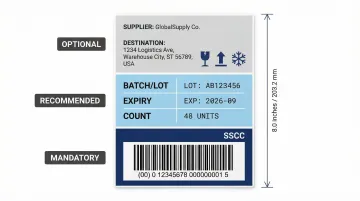
Top building block (optional): Contains free text, logos, addresses, and other non-encoded information like supplier name, destination address, or handling instructions. This block has no GS1 formatting requirements.
Middle building block (optional but recommended): Contains non-HRI text that mirrors barcode data using data titles (for example, "BATCH/LOT" instead of "AI 10"). All barcoded data elements must appear here as readable text so warehouse staff can verify shipment details without scanning.
Bottom building block (mandatory): Contains the GS1-128 barcode(s) and their Human Readable Interpretation (HRI). The SSCC barcode must always occupy the lowest position on the label—this placement is non-negotiable.
Label Segments for Different Supply Chain Roles
A GS1 Logistic Label can be divided into up to three segments, each representing information known at a different stage:
- Supplier segment: Product data (GTIN, batch, expiry) known at the time of packaging
- Customer segment: Order and routing data (PO number, ship-to GLN) known at order processing
- Carrier segment: Transport data (postal code, routing code, consignment number) known at shipment
Segments can be printed as separate labels stacked vertically on a pallet or carton. The segment containing the SSCC must always be positioned at the bottom. Once an SSCC label is applied, it must never be replaced or changed when adding a new segment—only additional segments can be stacked above it.
Mandatory vs. Optional Label Data
The SSCC (AI 00) is the only mandatory element on any GS1 Logistic Label. All other fields are optional, though inclusion depends on trading partner requirements and product type:
- For homogeneous pallets (all same product): Include AI (02) CONTENT plus AI (37) COUNT to identify the contained trade item and quantity
- For mixed pallets (multiple products): Use SSCC only—no GTIN data can be included on the label itself; the ASN must communicate contents
Label Specifications: Print Quality, Sizing, and Placement
A label with perfect data content can still cause a compliance failure if the barcode cannot be scanned. Platform receiving systems, automated conveyors, and dark store scanners all operate under different conditions than a handheld scanner in a quiet warehouse. They require higher print quality, precise sizing, and strategic placement to pass.
Standard Label Sizes
Two standard GS1 label sizes dominate Quick Commerce logistics:
- A6 (105mm × 148mm) or 4×6 inch: Compact labels used when only the SSCC or limited additional data is encoded
- A5 (148mm × 210mm) or 6×8 inch: Pallet labels that carry full trade item data, batch information, and expiry dates
Barcode Dimension Requirements
X-dimension is the width of the narrowest bar element in the barcode. It controls overall barcode width and scanning reliability — smaller values save label space but demand higher print quality.
| Specification | Requirement | Notes |
|---|---|---|
| X-dimension range | 0.495mm – 0.94mm | Target: 0.495mm |
| Minimum barcode height | 31.75mm (1.25 inches) | Excludes HRI text below bars |
| Quiet zones | At least 10X on each side | Blank margins; no graphics or text |
| Orientation | Horizontal (picket fence) only | Ladder orientation not permitted |
Print Quality and Barcode Grading
Barcode quality is measured using the ANSI grading scale (A through D). Most major retailers and Quick Commerce platforms require ANSI A or B grade. The grading evaluates:
- Symbol contrast (difference between bars and background)
- Minimum reflectance (how much light the background reflects)
- Modulation (consistency of bar widths)
- Defects (voids, spots, scratches)
- Decodability (whether scanners can read it reliably)
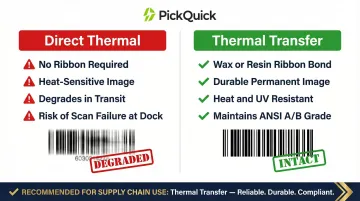
Thermal transfer printing produces higher ANSI grades than direct thermal because it uses a wax or resin ribbon to create a durable image resistant to heat, friction, and UV exposure. By contrast, direct thermal images can degrade during truck transit and fail at the receiving dock.
Print black barcodes on white backgrounds. Red-tinted bars or backgrounds can render the barcode invisible to red-light laser scanners used in many automated receiving systems.
Label Placement Rules
For pallets:
- Position barcodes between 400mm and 800mm from the base of the pallet
- Maintain at least 50mm clearance from any vertical edge
- Apply identical labels to two adjacent sides of each pallet to ensure one label remains visible regardless of pallet orientation
For cartons and cases:
- Target placement for the bottom of the barcode: 32mm from the natural base of the item
- Maintain at least 19mm clearance from any vertical edge
- Never place labels where they fold over edges, overlap seams, or sit under shrink wrap or stretch film
GS1 Application Identifiers: The Data Language Inside the Barcode
Application Identifiers (AIs) are 2-to-4-digit numeric codes placed before each data field in a GS1-128 barcode. They tell the scanning system what type of data follows and in what format. Without AIs, raw barcode data is unreadable by downstream systems.
Most important AIs for product and logistics labeling:
| AI Code | Data Element | Typical Use |
|---|---|---|
| (00) | SSCC | Identifies the logistics/shipping unit |
| (01) | GTIN | Identifies the trade item itself |
| (02) | GTIN of contained items | Identifies items inside a logistics unit |
| (10) | Batch/Lot Number | Traceability and recall tracking |
| (11) | Production Date (YYMMDD) | Manufacturing records |
| (15) | Best Before Date (YYMMDD) | Shelf-life management |
| (17) | Expiry Date (YYMMDD) | Compliance for regulated categories |
| (21) | Serial Number | Unit-level tracking |
| (37) | Count of contained items | Must pair with AI (02) |
Concatenation: Encoding Multiple Data Elements
Multiple AIs and their data can be encoded into a single GS1-128 barcode (element strings chained together). This reduces label space and enables one scan to capture all relevant data—SSCC, batch, expiry, and count without additional scanning steps.
Fixed-length data elements should be encoded before variable-length elements to simplify parsing by the scanning system.
Critical AI Rules
Two rules catch brands out most often during compliance audits:
AI (01) and AI (02) must never appear together on the same label. AI (01) identifies the logistics unit as a trade item; AI (02) identifies the items contained within it. A unit cannot be both container and contents simultaneously — this is a normative GS1 prohibition, not a recommendation.
If you use AI (02) to declare what's inside, GS1 requires you to also include AI (00) SSCC and AI (37) COUNT. Declaring contents without a unit count is an incomplete and non-compliant encoding.
How to Get GS1 Registered and Obtain Barcodes in India
To generate valid GTINs and SSCCs, your brand must obtain a GS1 Company Prefix from GS1 India, the official GS1 Member Organisation for India. The GS1 Company Prefix is the root of all identifiers you assign—without a valid prefix, barcodes cannot be verified by trading partners, and platforms will reject your products during catalog upload.
Registration steps:
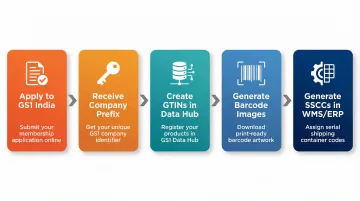
- Apply to GS1 India with business details and product count estimates
- Receive your GS1 Company Prefix (typically 7-10 digits depending on your company size and SKU range)
- Create and manage GTINs using GS1 India's Data Hub or approved barcode management tools
- Generate barcode images for print using compliant software or design templates
- Generate SSCCs from your WMS or ERP system for logistics labels using your Company Prefix
Membership fees vary by product count and company size. Check GS1 India's current fee structure at https://gs1india.org for tier pricing based on your SKU range.
Quick Commerce Platform Requirements
For Quick Commerce platforms like Blinkit, Zepto, Swiggy Instamart, and JioMart, GS1-compliant EAN-13 barcodes on product packaging are a prerequisite for listing. Platform catalog systems validate GTINs during the upload process—unregistered or invalid GTINs trigger automatic rejections.
Brands working with an end-to-end Quick Commerce operator like PickQuick can access compliance and onboarding support that compresses the typical timeline from months to weeks. PickQuick handles barcode and GS1 readiness as part of pre-launch brand preparation, covering:
Brands working with an end-to-end Quick Commerce operator like PickQuick can access compliance and onboarding support that compresses the typical timeline from months to weeks. PickQuick handles barcode and GS1 readiness as part of pre-launch brand preparation, covering:
- GS1 India registration and prefix setup
- Barcode image generation to platform specifications
- Label template verification before go-live
This ensures products meet platform barcode requirements without the delays that slow independent onboarding.
Common GS1 Compliance Failures and How to Avoid Them
SSCC Data Mismatch
Failure: The SSCC number on the physical label does not match the SSCC in the dispatch advice or ASN sent electronically to the platform.
The platform's WMS expects a specific SSCC from the ASN. When the scanned label doesn't match, the system flags the unit as "unexpected" and holds it for manual resolution — breaking automated receiving at the dark store entirely.
Fix:
- Ensure your label generation system and ASN/dispatch system draw from the same data source at the same workflow point
- If your WMS generates the SSCC, configure it to trigger the ASN transmission automatically
- If labels are printed separately, run a reconciliation check before dispatch
Print Degradation
Failure: Direct thermal labels scan perfectly when printed but fail at the destination because heat in truck containers, friction during handling, or UV exposure fades the image.
By the time the pallet reaches the dark store dock, the barcode has degraded below the ANSI B threshold — causing scan failures that delay putaway and trigger discrepancy notes.
Fix: Use thermal transfer printing for any supply chain with transit exposure risk. Thermal transfer uses a wax or resin ribbon that bonds permanently to the label, creating an image resistant to heat, friction, and UV exposure. Regular print head calibration prevents streaking and inconsistent bar widths that reduce scan reliability.
Missing or Incorrect AI Structure
Failure: Encoding a batch/lot number without using AI (10), or omitting required AIs that the trading partner expects in the barcode.
This causes partial scan failures where the SSCC scans successfully but supplementary data (batch, expiry, count) is lost. Platforms that require traceability data for FMCG categories like dairy or spices will reject shipments with incomplete AI encoding.
Fix:
- Verify AI structure during label template setup — before any live shipments go out
- Run test scans against your trading partner's specifications to confirm full data capture
- Use GS1-compliant label design software that enforces correct AI sequencing and blocks invalid combinations like AI (01) + AI (02) on the same label
Frequently Asked Questions
What is a GS1 label?
A GS1 label (also called a GS1 Logistic Label) is a standardized shipping label that carries the SSCC barcode in GS1-128 symbology as its only mandatory element, used to identify and track logistic units from supplier warehouse to dark store receiving. Optional fields include human-readable data about the product, shipment, and carrier.
How do I get an EAN code for my product?
EAN codes (which encode a GTIN) are obtained by registering with GS1 India to receive a GS1 Company Prefix. After registration, you create individual GTINs for each product variant using GS1 India's Data Hub or approved barcode management tools. Each unique product—different size, flavour, or pack configuration—requires its own EAN/GTIN.
How much does a GS1 barcode cost, and can I get one for free?
GS1 barcodes are not sold individually. Brands pay an annual membership fee to GS1 India to receive a Company Prefix that lets them generate as many GTINs as needed within their prefix range. Fees are tiered by company size and product count. So-called free barcode generators online do not provide legitimate GS1-registered GTINs and will be rejected by major retailers and Quick Commerce platforms like Blinkit and Zepto.
What does it mean to be GS1 compliant or certified, and is it mandatory?
GS1 compliance means your barcodes, labels, and data conform to GS1 standards — correct symbology, valid Company Prefix, proper AI usage, and label specifications. It is not a government mandate, but it is effectively mandatory because major retailers and Quick Commerce platforms like Blinkit and Zepto reject products or shipments with non-compliant or unverifiable barcodes.
What is the difference between GTIN and a batch or lot number?
A GTIN (Global Trade Item Number) permanently identifies what a product is — its type, size, and variant — and never changes for a given SKU. A batch or lot number (encoded with AI 10) identifies which specific production run a unit came from, changes with every production cycle, and enables traceability and recall management as an attribute layered on top of the GTIN.
What are application identifiers in GS1?
GS1 Application Identifiers (AIs) are short numeric prefixes (typically 2-4 digits) placed before each data field inside a GS1-128 barcode to tell the scanner what type of data follows. For example, AI (01) signals a 14-digit GTIN, and AI (10) signals a batch or lot number. AIs appear both machine-encoded in the barcode and as human-readable text below it.