For brands with strong offline demand, this channel isn't optional anymore. It's where shelf presence translates directly to daily revenue. But unlike Amazon or Flipkart, getting listed on Blinkit and Zepto isn't self-service. It requires Category Manager negotiations, APOB registrations, NPI approvals, and purchase orders.
This guide walks through every stage — from documents to going live to scaling multi-city.
Key Takeaways
- Blinkit and Zepto require structured onboarding through Category Managers — not a self-serve listing portal
- You'll need GST, FSSAI (for food), PAN, bank details, and APOB registrations for each state you supply
- Typical go-live timelines are 45–60 days for Blinkit and 30–45 days for Zepto
- Commission ranges from 10–20% depending on category, with additional deductions for GST on commission (18%) and TCS (0.1%)
- Maintaining fill rates above 90%, allocating promotional budgets per city, and keeping consistent supply are what determine whether a brand grows or gets deprioritized on the platform
Why Your Brand Belongs on Quick Commerce
Quick commerce serves high-intent, impulse-driven purchase moments — running out of milk, needing snacks at 11 PM, restocking personal care essentials. 58% of surveyed online grocery buyers now complete their full monthly shopping on quick commerce platforms, not just for forgotten items anymore.
Core business advantages:
- No last-mile logistics to manage — platforms handle delivery
- Daily repeat order potential with high-frequency categories
- Hyperlocal brand visibility in urban pockets
- Access to customers who wouldn't find your brand in traditional retail
- Faster inventory turns compared to modern trade
These advantages compound fastest for brands already moving volume offline. High-frequency FMCG — dairy, staples, snacks, beverages, personal care, and masalas — rotates weekly with 30–90+ day shelf life, making it a natural fit. Brands performing best on quick commerce share a common profile:
- Strong GT/MT demand already established in their home state
- Regional champions expanding city-by-city rather than going national overnight
- SKUs with weekly or near-daily replenishment cycles
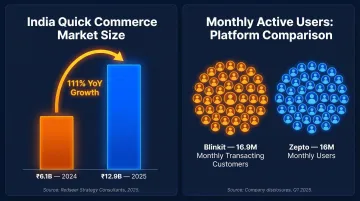
The customer base is already there. As of Q1FY26, Blinkit reported 16.9 million average monthly transacting customers, and Zepto served approximately 16 million monthly users. For regional brands with proven offline demand, that's a ready urban audience waiting to find you.
Who Can Sell and What Documents You Need
Eligibility
Manufacturers, brand owners, authorised distributors, importers, and D2C brands can apply. Individual sellers without business registration cannot. Both platforms follow a curated model and assess supply capability before approving new vendors.
Once you confirm eligibility, gather these documents before starting your application — incomplete submissions are a leading cause of delays.
Document Checklist
Both platforms require the same core set:
- GST Certificate — active GSTIN
- PAN Card — business + proprietor/director
- FSSAI License — mandatory for food and beverage categories
- Cancelled Cheque + Bank Statement — for payment verification
- Brand Authorisation Letter — if not the brand owner
- Business Registration Certificate
All documents must show identical business names. Mismatched names across documents trigger automatic rejection.
APOB Requirement
If you want to supply dark stores in multiple states, you need Additional Place of Business (APOB) GST registration for each state. CBIC clarifies that third-party warehouses function as a "place of business", meaning businesses must obtain separate GST registration in the state where the warehouse is located.
Without APOB, platforms cannot issue purchase orders for that state's warehouses, effectively blocking supply to those dark stores. Approval takes 2–4 weeks per state, so start this process in parallel with your application — not after.
How to Get Listed: The Onboarding Process on Blinkit and Zepto
Quick commerce differs fundamentally from traditional marketplaces: brands cannot self-list. Every listing goes through a Category Manager (CM) who approves SKUs, negotiates commercial terms, guides launch cities, manages promotions, and resolves fulfilment issues. Understanding this CM-led structure shapes every step of what follows.
Blinkit Onboarding: Stage by Stage
Stage 1 — Application and CM Assignment
Visit seller.blinkit.com, fill in business details, select product categories, and submit. Blinkit's vendor acquisition team reviews the application (typically 3–5 business days) and assigns a Category Manager if approved.
What to bring to the first CM discussion:
- Current monthly production capacity
- Target cities for launch
- Inventory commitment levels
- Which SKUs to lead with
Stage 2 — Documentation and Commercial Negotiation
Submit the full document set directly to the CM — there is no portal for this stage. Once verified, both sides negotiate commission percentage (typically 10–20% by category), promotional wallet deposits, RTV policies, payment cycle terms, and launch city sequence. Document everything in the vendor agreement before supply begins.
Stage 3 — NPI (New Product Introduction) Process
The CM initiates product listing via an internal template — sellers do not have direct portal access.
Required for each SKU:
- SKU name, MRP, pack size
- GS1-standard barcode
- High-resolution images (front, back, nutritional panel, certifications)
- Product description
- Shelf life
SKU approval takes 5–10 business days. Product images appear at thumbnail size inside the app — blurry or low-contrast shots directly reduce click-through and conversion, so professional photography isn't optional.
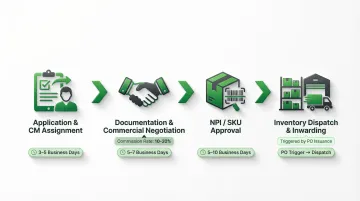
Stage 4 — Inventory Dispatch and Warehouse Inwarding
Blinkit generates Purchase Orders (POs) once SKUs are live. You dispatch stock to the assigned warehouse using your own logistics. The warehouse scans, quality-checks, and confirms stock before distributing to dark stores across its network.
Key requirements:
- Minimum 90+ days remaining shelf life
- Correct MRP labels
- GS1-standard barcodes
Poor-quality dispatch results in rejection.
Zepto Onboarding: Key Differences
The Blinkit process above gives you a working mental model — Zepto's flow is structurally similar, but a few operational differences matter in practice. Zepto offers the Zepto Seller Hub — a direct portal where sellers can upload products, monitor inventory, and track settlements without routing every update through the CM. Zepto states onboarding takes within 15 business days for qualified brands, extending up to 45 days during major sale events.
Meaningful operational differences:
- Zepto operates on weekly payment cycles vs. Blinkit's bi-weekly
- The Seller Hub provides real-time stock alerts and low-inventory warnings
- Document feedback is returned directly through the portal rather than via email chains — speeding up corrections
Registration begins at brands.zepto.co.in.
Platform Fees, Commissions, and What You Actually Take Home
Base Commission Structure
| Platform | Commission Model | Category Ranges |
|---|---|---|
| Blinkit | Price-band variable (March 2025) | 2% (<₹500); 6% (₹500–₹700); 18% (>₹1,200) |
| Zepto | Category-based | Staples: 10–15%; Snacks: 15–18%; Personal Care: 18–25% |
Additional Deductions
- GST on commission: 18% applied to the commission amount itself
- TCS (Tax Collected at Source): 0.1% of selling price (reduced from 1% effective October 2024)
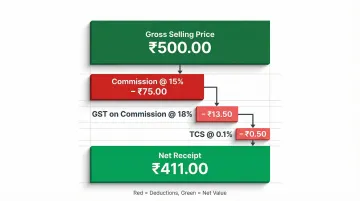
Worked Example:
Gross selling price: ₹500 Commission (15%): ₹75 GST on commission (18%): ₹13.50 TCS (0.1%): ₹0.50 Total deductions: ₹89 Net receipt per unit: ₹411
Additional Cost Layers
Inwarding fees per unit — charged when stock enters the warehouse Storage fees — applied to slow-moving SKUs RTV (Return to Vendor) charges — logistics cost for rejected or near-expiry stock Promotional wallet deposits — mandatory advertising budgets at onboarding
Promotional Costs
Sponsored listings, category page banners, and flash sale participation drive visibility on both platforms. Typical entry points: ₹25,000 per SKU per cluster on Blinkit, and bundled packages starting at ₹5–6 lakh on Zepto.
Pricing Strategy
Commission is calculated on the selling price, not MRP. Brands must build platform economics into their price structure. Compare pricing across Blinkit, Zepto, and offline retail to avoid margin leakage — pricing mismatches create channel conflict.
Payout Mechanics
Blinkit pays bi-weekly; Zepto pays weekly. Both platforms deduct commissions, GST on commission, TCS, and other charges before settlement, then transfer funds to the registered bank account with an itemised deduction statement. Keep GST returns filed and PAN verification current — any compliance gap can trigger a payment hold.
Scaling After Go-Live: Inventory, Promotions, and Multi-City Growth
Inventory Management: The #1 Growth Lever
Stockouts damage ranking algorithms, suppress visibility for weeks after restocking, and cause permanent customer loss. Maintain 20–40% safety stock buffer based on daily sales velocity. Monitor stock levels, OOS rates, and RTV incidents daily.
Platform ranking prioritises availability over sales volume — consistent stock presence matters more than peak order days.
Promotional Strategy for Sustainable Growth
Three formats drive the most visibility on quick commerce platforms:
- Sponsored search placements
- Category page banners
- Flash sale participation
Track promotional ROI per campaign — cost per order, net margin after discount and ad spend — rather than gross sales volume. Aligning promotional timing with CM guidance often secures better placement for the same budget.
Multi-City Expansion: The APOB Sequencing Strategy
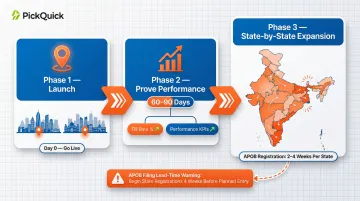
Phased approach:
- Launch in 2 cities
- Prove performance (60–90 days)
- Expand state by state
Each new state requires a new APOB registration (2–4 weeks per state). File APOB applications before the platform signals readiness to expand — not after.
Managing APOB compliance, inventory allocation, and PO fulfilment across 5+ states is operationally complex. Most brands underestimate this coordination burden until they're mid-expansion.
Operators like PickQuick hold active APOB registrations and established dark store relationships across 10,000+ pincodes — cutting go-live timelines from months to weeks for brands that don't want to build that infrastructure from scratch.
SKU Strategy
Launch with 3–5 highest-velocity SKUs to build momentum and Category Manager trust before expanding catalogue. Adding SKUs follows the same NPI process and requires the same image/data quality standards — batch preparation saves time.
Product Listing Quality
Once your catalogue is set, listing quality determines whether those SKUs convert. Image quality, accurate MRP labelling, and complete product data (barcode, shelf life, nutritional info) are the three most common reasons SKUs are rejected or underperform. Investing in professional product photography pays back in higher conversion rates.
Blinkit vs. Zepto: Choosing Your First Platform
Key Differences
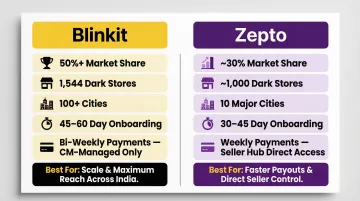
Blinkit:
- Holds over 50% market share, stronger in tier-1 cities
- Operates 1,544 dark stores across 100+ cities
- Longer onboarding timeline (45–60 days)
- Requires larger promotional investment
- Fully CM-managed process with no seller portal
Zepto:
- ~30% market share, concentrated in 10 major urban markets with depth over breadth
- Operates ~1,000 dark stores across 10+ major urban centres
- Faster onboarding (30–45 days)
- Weekly payment cycles
- Direct control via Seller Hub
- Gives brands direct visibility into stock, orders, and performance from day one
Smart Sequencing Approach
Launch on one platform first, stabilise operations (60–90 days), then add the second. This allows supply chains to adjust, teams to learn platform dynamics, and metrics (OOS, RTV, CM relationships) to mature before managing dual platforms simultaneously.
Which platform to start with depends on where your brand stands today:
- Start with Blinkit if you have established demand, a larger promotional budget, and can absorb a 45–60 day onboarding window
- Start with Zepto if you want faster go-live, direct operational control, and are testing QC viability before committing heavier spend
Frequently Asked Questions
Can I sell my products on Zepto and Blinkit?
Yes — manufacturers, brand owners, authorised distributors, and D2C brands with valid GST registration, FSSAI (for food), and proper business documentation are eligible. Individual sellers without business registration cannot apply.
How much do Zepto and Blinkit charge sellers?
Commission ranges from 10–20% by category, plus 18% GST on the commission and 0.1% TCS on the selling price. Rates are negotiated with the Category Manager during onboarding and vary by brand, category, and volume.
Which is more profitable, Blinkit or Zepto?
Profitability depends on category, volume, and operational efficiency — not the platform. Zepto's weekly payouts and Seller Hub suit brands that need cash flow visibility; Blinkit's larger scale suits those chasing higher absolute volumes. Your pricing structure, city presence, and promotional budget determine the better fit.
What documents do I need to sell on Blinkit and Zepto?
Core requirements include: GST Certificate, PAN Card, Business Registration Certificate, Cancelled Cheque, and Bank Statement. Food brands also need an FSSAI License; non-brand-owners need a Brand Authorisation Letter. All documents must show identical business names to avoid rejection.
What is APOB and why do I need it to sell on quick commerce platforms?
APOB (Additional Place of Business) is a GST registration requirement for any state other than your home state where you want to supply inventory. Without it, platforms cannot issue purchase orders for that state's warehouses, effectively blocking supply to those dark stores.
How long does it take to go live on Blinkit or Zepto?
Blinkit typically takes 45–60 days from application to first sale; Zepto takes 30–45 days. These timelines assume clean documentation from the start. APOB delays, incomplete docs, or slow CM negotiations can extend both significantly. Brands working with an established QC operator can compress these timelines to a few weeks.