Introduction
Brands selling simultaneously on Blinkit, Zepto, Swiggy Instamart, and JioMart face a critical visibility problem: no single dashboard shows whether products are actually live, in-stock, and discoverable across all platforms. This invisibility directly costs sales. A SKU can show "active" in your Blinkit Seller Hub while being unavailable in 40% of target dark stores—and you won't know until revenue starts declining.
Each platform has its own seller dashboard, but tracking listing health, availability, and performance across all four is far more complex than logging into separate portals. Three problems surface repeatedly:
- Pricing gaps emerge when platform-specific promotions aren't synced across channels
- Stockouts persist for days because dark store inventory reports don't aggregate automatically
- Catalog errors—wrong categories, missing picker images, EAN mismatches—suppress rankings without triggering any notifications
This guide walks through what to track, how to build a reliable cross-channel monitoring process, and the mistakes that silently drain revenue from brands already live on QC platforms.
Key Takeaways
- Tracking listings across Quick Commerce channels means watching availability, pricing accuracy, catalog status, and search performance simultaneously across Blinkit, Zepto, Swiggy Instamart, and JioMart
- Without pincode-level visibility and a centralized tracking system, listing gaps go undetected until they've already cost you sales
- Four steps drive the fix: consolidate catalog data, monitor live availability by pincode, track channel-level metrics, and set up alerts with regular review cadences
- Most brands lose revenue not from bad products but from undetected listing gaps—the fix is a structured tracking system, not more ad spend
How to Track Multiple Listings Across QC Channels
Step 1: Consolidate Your Catalog Data Across All Platforms
Start by exporting your current active catalog from each platform's seller portal:
- Blinkit Merchant Dashboard — Export SKU names, EAN codes, MRP, selling price (SP), landing price (LP), images, and listing status
- Zepto Seller Portal — Pull product catalog with pack sizes, barcodes, pricing, and regulatory compliance status
- Swiggy Instamart Partner Hub — Download SKU details including category mappings and promotional pricing
- JioMart Partner Portal — Export catalog with product attributes and approval status
Cross-check that every SKU you intend to sell is listed and approved on every platform. Look specifically for:
- Missing products that should be listed but aren't
- Rejected listings stuck in "under review" status
- EAN code mismatches across platforms
- Category mapping inconsistencies
- Image quality flags or missing picker images
Create a master catalog tracker—either a shared spreadsheet or a dedicated tool—with one row per SKU and columns for each platform. Include these fields:
| SKU Name | EAN | Category | MRP | Blinkit SP | Zepto SP | Instamart SP | JioMart SP | Blinkit Status | Zepto Status | Instamart Status | JioMart Status |
|---|
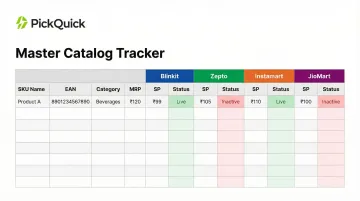
This single source of truth lets you audit catalog consistency at a glance and catch discrepancies immediately.
Step 2: Check Live Availability at the Pincode and Dark Store Level
Being "listed" on a platform and being "available" in target pincodes are fundamentally different. Blinkit operates 1,544 dark stores, Swiggy Instamart runs 1,021 locations, and Zepto maintains 900+ stores. Your SKU must have physical inventory in the specific dark store serving a pincode for consumers in that area to see it.
Platform-level "Active" status does not guarantee consumer visibility — Blinkit, Zepto, and Swiggy Instamart restrict product visibility strictly to dark stores where inventory is physically present.
How to verify dark store coverage:
- Pull inventory reports from each platform showing store-wise availability
- Identify which dark stores have stock versus which show zero inventory
- Map dark store coverage to your priority pincodes and cities
- Calculate availability percentage: (Dark stores with stock ÷ Total dark stores in target cities) × 100
Set a minimum availability threshold — for example, flag any SKU showing less than 80% store coverage across key pincodes. According to platform requirements, Blinkit expects brands to sustain a fill rate above 90%; dropping below 80% triggers algorithmic demotion, reducing search rank and removing the SKU from active pincodes entirely.
Stockouts at even a handful of stores can quietly cut a large share of your orders. A thousand units in a central warehouse count for nothing if the dark store serving a pincode has run dry — that store goes dark for consumers in that area immediately.
Step 3: Track Listing Performance Metrics by Channel
Pull platform-level performance data for each SKU. Key figures to capture include:
- Impressions (how many times the product appeared in search/browse)
- Click-through rate (CTR)
- Conversions
- Average order value (AOV) per channel
- Revenue contribution by platform
Benchmark context: India's quick commerce sector reached $6-7 billion in 2024, with FMCG brands deriving 30-60% of their online sales from QC platforms. However, specific listing conversion rate benchmarks are not publicly published by platforms.
If a product converts well on one platform but underperforms on another, the cause is usually a listing quality issue:
- Wrong category placement (reducing discoverability)
- Poor image quality or missing picker images
- Incomplete product descriptions
- Incorrect pack size or weight information
Log price consistency across platforms:
Track both MRP and selling price for each channel in your master tracker. If the same product is priced differently due to platform-specific promotions or errors, it can trigger buyer confusion and platform flags. Zepto's "Swap and Save" feature actively suggests cheaper alternatives at checkout — even a ₹1 difference can redirect orders to competitors.
Track promotional pricing as a separate field in your master tracker so deal expirations don't accidentally create price inconsistencies that linger after a campaign ends.
Step 4: Set Up Alerts and a Regular Review Cadence
Configure in-platform notifications where available:
- Stockout alerts when inventory falls below minimum thresholds
- Listing deactivation alerts when platforms reject or suppress SKUs
- GRN/DN (Goods Received Note/Discrepancy Note) alerts flagging inwarding issues
Supplement with manual or tool-based checks for metrics platforms don't automatically flag:
- Search rank drops for primary keywords
- Sudden conversion rate dips
- Availability percentage declines
- Competitor pricing changes
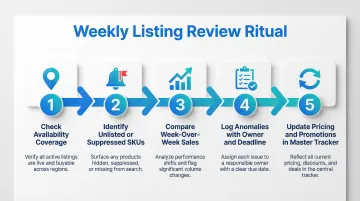
Establish a weekly review ritual:
- Check availability coverage across all platforms and pincodes
- Identify any newly unlisted or suppressed SKUs
- Compare week-over-week sales per channel
- Log anomalies with a clear owner and resolution deadline
- Update pricing and promotional status in your master tracker
For brands managing 20+ SKUs across 3+ platforms, consider whether this process needs a dedicated team member or an operator partner. Managing simultaneous presence across Blinkit, Zepto, and Instamart requires maintaining separate replenishment cycles for each platform's dark store network. Done manually, that's a real operational load — which is why many regional brands eventually hand this off to a dedicated QC operator rather than stretching internal teams across four platforms at once.
What You Need Before You Start Tracking
Most tracking failures aren't methodology problems — they're preparation problems. Without the right access, infrastructure, and a clean catalog baseline, your tracking data will mislead you before you even begin.
Platform Access and Permissions
Ensure you have active seller or partner credentials for every QC platform you operate on, with sufficient access levels to:
- View inventory reports broken down by dark store
- Access listing status and catalog health dashboards
- Pull performance data (impressions, conversions, revenue)
- Configure notifications and alerts
Some platforms restrict access to certain dashboards based on account tier or operator setup. Verify your permissions cover all necessary reporting features before building your tracking system.
Centralized Tracking Infrastructure
Once your access is confirmed, you need a place to consolidate data across platforms. Your two practical options:
- Shared spreadsheet: Works for early-stage tracking if column structure is consistent across all platforms
- Third-party analytics tool: Required once you're managing more than 2-3 platforms or 20+ SKUs
One critical limitation to plan around: platforms like Blinkit and Zepto don't natively push data to a single dashboard. That aggregation step falls to you — or your QC operator. PickQuick's Quick Commerce Control Tower, for instance, pulls pincode-level availability, outage signals, and lost sales data across all platforms into one view, which removes the manual export-and-merge step entirely.
A Baseline Catalog Audit
Before you can track performance over time, you need a clean starting point. Conduct a one-time audit of every SKU to confirm:
- Correct product titles and brand names
- Complete image sets (front of pack, back of pack, picker images, barcode images)
- Accurate EAN codes matching physical packaging
- Proper category mappings for search discoverability
- Consistent MRP, SP, and LP across platforms
- Complete regulatory information (FSSAI details, ingredient lists, HSN codes)
Any discrepancy here will skew your ongoing tracking data. A SKU with wrong category placement on Zepto but correct placement on Blinkit will show performance differences that appear to be demand-related but are actually catalog errors.
Key Metrics That Affect Listing Performance Across Channels
Not all data points are equally useful. The metrics below most directly determine whether a listing is generating revenue or underperforming without clear signals.
Availability Percentage
Availability percentage measures what share of target dark stores and pincodes actually have your product in stock and live. A listing can appear "active" on your dashboard while being invisible to buyers in certain areas.
Platforms algorithmically deprioritize products with inconsistent availability. Blinkit's algorithm prioritizes availability over sales volume: a product that goes out of stock loses search visibility, which reduces order volume, signals weaker demand, and shrinks future inventory allocation (Min-Max levels). Zepto's algorithm de-ranks out-of-stock SKUs aggressively — a two-day stockout can set back search placement by weeks.
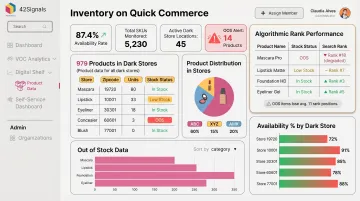
Algorithmic penalties also reduce future exposure, so the visibility loss outlasts the stockout itself.
Listing Status and Catalog Health Score
Each platform scores or flags listings based on completeness. Missing images, incorrect weights, vague descriptions, or category mismatches can suppress a listing even if it's technically "live."
Blinkit officially rejects listings for any of the following:
- UPC image missing or mismatched
- Wrong product category assigned
- Images unclear or below quality threshold
- Attribute values missing or incomplete
These errors prevent the SKU from appearing in search or reduce its ranking entirely.
A listing with poor catalog health may be discoverable but buried in results. Fixing completeness — adding high-quality picker images, correcting category placement, filling missing attributes — often lifts impressions within 48–72 hours. Blinkit's minimum requirements include GS1-standard UPC/EAN codes, product images, picker images (first layer of packaging), and FSSAI images for edibles.
Price Consistency Across Channels
If the same SKU has different selling prices across Blinkit and Zepto — whether due to platform-specific deals or accidental errors — it can confuse buyers and trigger platform flags. To diagnose the impact, run a channel-by-channel revenue comparison:
- If total revenue stays flat while one platform's sales spike, price inconsistency may be shifting orders rather than creating new demand
- If a ₹40 product on Blinkit is ₹39 on Zepto, Zepto's "Swap and Save" feature will aggressively downsell competitors at checkout, directly intercepting purchase intent
Track both promotional pricing (intentional) and pricing errors (accidental) separately. Set alerts when selling prices diverge beyond acceptable thresholds.
Order Fill Rate and Return Rate
Order fill rate measures how often a placed order is actually fulfilled versus cancelled due to inventory issues. A high cancellation rate on a specific platform typically signals a replenishment or Min-Max configuration problem at the dark store level.
Swiggy Instamart enforces strict On Time In Full (OTIF) and Fill Rates via its Vendor Score. Low scores signal supply chain unreliability and lead directly to reduced Purchase Order (PO) volumes and potential SKU delisting.
Blinkit requires a sustained 90%+ fill rate. Dropping below 80% triggers algorithmic demotion — reducing search rank, ad visibility, and active pincode coverage simultaneously. Visibility losses at this stage extend well beyond the unfulfilled orders themselves.
Common Mistakes When Tracking Listings Across QC Channels
Most brands running across Blinkit, Zepto, and Swiggy Instamart make the same operational errors when tracking listings. These gaps are fixable—but only once you know where they show up.
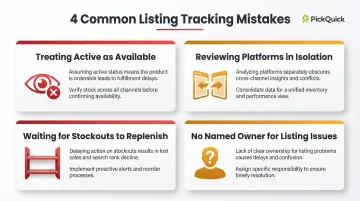
Treating "active" as "available": Native seller portals show account-level status, not pincode-level visibility. A listing can appear active while being stocked out at three dark stores in your top city, suppressed by a catalog error, or silently dropping in rank—none of which trigger a notification.
Reviewing platforms in isolation: A SKU that consistently underperforms on Zepto but leads on Blinkit almost always has a specific listing issue—wrong category mapping, missing attributes, or a weak image—that only surfaces when you compare the two side by side. Single-platform reviews hide these patterns entirely.
Waiting for stockouts before replenishing: By the time a product shows out-of-stock, it has already missed days of demand and begun losing search rank. Track inventory velocity per dark store and replenish based on depletion rate. Low-stock alerts are a fallback, not a system.
No named owner for listing issues: Most brands collect tracking data but never assign anyone to act on it. Each platform should have a designated owner with a defined resolution SLA—so when a listing drops or a price error appears, someone fixes it the same day, not the same week.
Troubleshooting Common Listing Issues Across QC Platforms
Even well-managed tracking systems surface issues regularly. A structured process cuts resolution time — here are the three most common problems and exactly where to look.
Product Shows as Live But Orders Are Not Coming In
Usually the listing is active at the platform level but absent from the dark stores covering your target pincodes — or ranked too low in search to generate impressions.
Check:
- Pull a pincode-level availability report to confirm store coverage
- Check the product's search rank for its primary keywords on the platform
- Compare catalog completeness score against top competitors in the same category
- Verify that Min-Max inventory levels are configured properly at dark stores
- Review packaging quality and GRN/DN scores to ensure inwarding isn't blocking replenishment
Sudden Drop in Sales on One Platform With No Obvious Change
Common triggers include algorithm updates, catalog quality issues causing listing suppression, competitor promotional pricing, or a shift in category placement.
Check:
- Review the platform's listing health dashboard for any flags or warnings
- Check whether the product's category assignment has shifted
- Compare the product's price and promotional status to the top 3 competitors currently ranking above it
- Verify availability percentage hasn't dropped below platform thresholds
- Check RO (Replenishment Order) confirmation speed and Motherhub inventory levels
Pricing Discrepancy Detected Across Channels
This usually traces back to a platform-specific promotional deal applied without updating the master tracker, or a manual price change made on one portal that wasn't carried across.
Check:
- Cross-reference your master catalog tracker against each platform's current live price
- Identify which platform shows the discrepancy and correct it at the portal level
- Log the change in your master tracker immediately
- Add a standing rule: any pricing update must be replicated across all platforms within 24 hours
Frequently Asked Questions
How to measure channel performance across QC platforms?
Compare key metrics—availability percentage, impressions, conversion rate, order fill rate, and GMV—across each platform in a centralized tracker, reviewed weekly. Consistent cadence is what surfaces trends early enough to act on them.
What metrics should I track for my product listings on Blinkit and Zepto?
Track listing status, availability across dark stores, search rank, click-through rate, conversion rate, and price accuracy. Availability percentage and order fill rate are the most operationally critical because they directly affect algorithmic ranking. Platforms deprioritize SKUs with inconsistent availability or low fill rates.
How do I know if my listing is live and available across all pincodes?
Being "listed" on a platform and being "available" in all target pincodes are different. Brands need to pull dark-store-level inventory reports from each platform and verify coverage across their priority geographies, not just check overall listing status on the partner dashboard.
What causes listing unavailability across Quick Commerce platforms?
The most common causes include:
- Dark store stockouts from delayed replenishment
- Catalog rejection due to incorrect EAN or image issues
- Min-Max configuration errors
- Platform-triggered listing suppression from low fill rates or poor catalog health scores
How often should I audit my product listings across QC channels?
At minimum, follow this audit cadence:
- Weekly: availability and status check for all active SKUs
- Bi-weekly: performance review comparing channel-level metrics
- Monthly: full catalog audit to catch listing quality issues or pricing inconsistencies
Can I track competitor listings across QC platforms?
Basic competitive listing data—such as pricing, promotional status, and category ranking—can be observed manually through the platform's consumer app. Some third-party tools like MetricsCart, 42Signals, and Actowiz Solutions offer category-level search rank tracking to benchmark listings against competitors. Verify capabilities directly with each vendor before committing.